
Paying shoppers late or wrong is the fastest way to lose a panel. A shopper who waits ten weeks for EUR 12 and then finds the purchase missing from the transfer does not complain. They stop accepting work. This post covers how to pay mystery shoppers in a way that holds up at a hundred audits a month: what an audit pays, why only validated work goes into the run, how a monthly payment period works, how expenses are handled, and what the bank file looks like. The numbers are made up; the steps are the ones a working agency follows.
One worked example runs through the article. A shopper visits a store on October 14. The audit carries a fee of EUR 12, a transportation fee of EUR 4 and a reimbursed purchase of EUR 6.90. The report is validated on October 20. October visits are paid in one run: validation closes on November 5, the period is exported on November 7, the transfer goes out on November 10. The shopper receives EUR 22.90.
What a shopper is paid for
Keep three amounts apart on every audit, from the schedule to the bank file.
- Fee. The pay for the visit and the report. In the example, EUR 12.
- Transportation fee. A flat amount for getting there. EUR 4. For long or multi-stop journeys a business trip replaces it.
- Other fee. Whatever the scenario forced the shopper to spend, usually a purchase that proves the visit happened. EUR 6.90, against the receipt photo in the report.
Each audit also carries a currency. Folding the three into one amount column costs you later, because the accountant needs reimbursements kept apart from pay. In Shopper-X the fee sits on the audit itself. A bulk edit in the schedule prices a whole wave in one step, and the report head lets a validator correct a single visit when the shopper had to buy a more expensive item than the brief assumed.
Pay validated work only
A submitted report is not a payable report. Between submission and payment sits validation: a reviewer checks the answers, photos, comment lengths and timing, scores the report, and either accepts it, returns it for corrections or marks it unacceptable. Pay only the accepted ones.
This works only if the audit status drives the payment list. Filter by status, take the validated audits into the period, and leave the returned and unacceptable ones out. A returned report shows up in a later run once the corrected version is accepted. An unacceptable report never does, and the shopper should learn why from the validator's remark, not from a missing transfer.
Two common mistakes: paying on submission "to keep shoppers happy", which removes the only lever you have when a report is thin, and holding the whole period until the last report is validated. Set a validation cut-off date instead, November 5 in the example, and let anything accepted after it roll into the next period. The report validation checklist covers what a reviewer checks before a report earns its fee.
The monthly payment period
A payment period is a named batch of audits and business trips paid together. Most agencies run one per month, named after the month of the visits, not the month the money moves. "October 2026" holds October visits even though the transfer leaves on November 10. The cycle has five steps.
- Open the period at the start of the month.
- Assign audits and trips. Filter the payment list by visit date and validated status, select all, assign to the period. Rows already in a period show its name, which is the protection against paying a visit twice. Add the approved business trips the same way.
- Review the exceptions. Rows with a transportation or other fee need a receipt or a note. Check them before closing, not after the accountant asks.
- Complete and export. Mark the period completed and export the workbook. Once the file has gone out, nothing in the period should change.
- Send the fee notification. One email to every shopper in the period. The periods list records whether it went out.
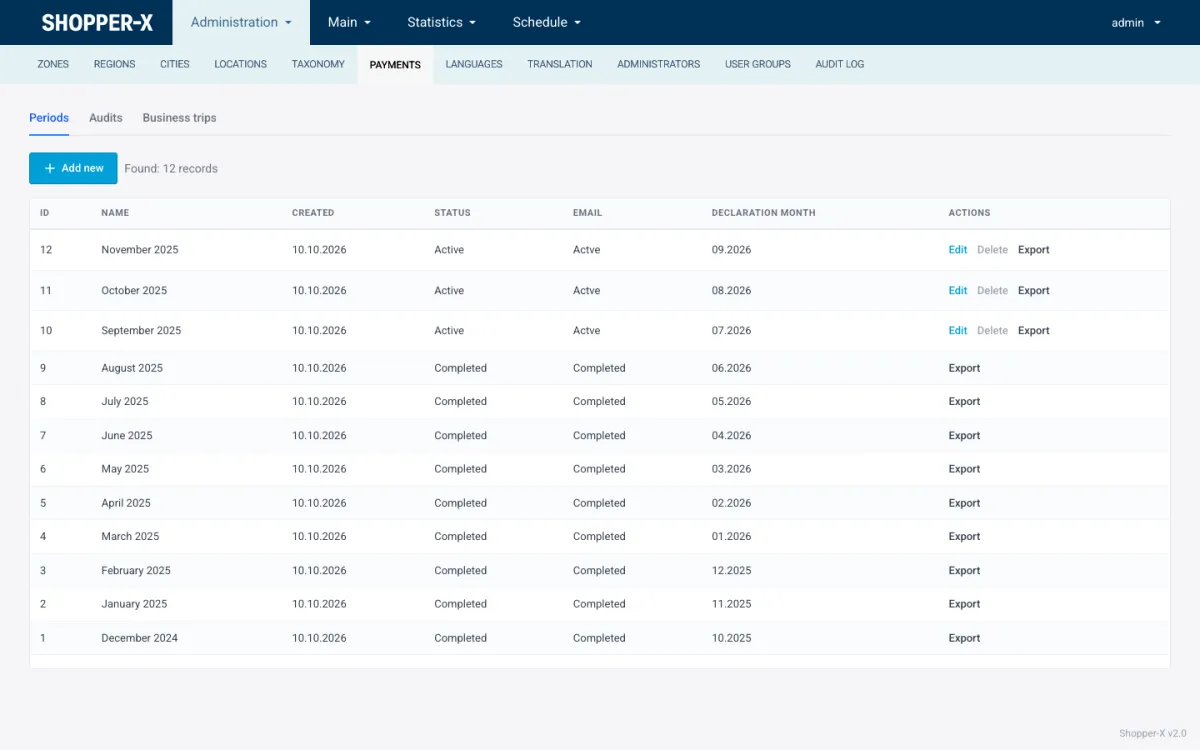
An example calendar for October visits:
| Date | What happens |
|---|---|
| October 1 | Period "October 2026" opened |
| October 1 to 31 | Visits, submissions, validation as reports arrive |
| November 5 | Validation cut-off; later acceptances roll into November |
| November 6 | Validated audits and approved trips assigned; exceptions reviewed |
| November 7 | Period completed and exported; file to the accountant |
| November 10 | Bank transfer; fee notification email sent |
Tell shoppers this calendar once, in the briefing and in the contract. A reliable 40 days beats a promised 14 that slips.
Expenses: flat transportation fee or a business trip
For a visit inside the shopper's own city a flat transportation fee is enough. Set it per audit and do not collect bus tickets for EUR 4.
A business trip is for the other case: several audits on one journey, with real costs nobody wants to split per visit. Example: a shopper covers three car dealerships in neighboring towns in one day, 180 km round trip. Instead of three transportation fees, the shopper files one trip that groups the three audits and records:
- the dates and the transport type (car, public transport, other);
- for a car, the fuel consumption and cost: at 7 liters per 100 km and EUR 1.50 per liter, the 180 km come to 12.6 liters and EUR 18.90;
- the route legs: home to dealership A, A to B, B to C, C to home;
- the receipts, uploaded as files: fuel, tolls, parking.
An administrator approves the trip. Once completed it is locked, so the PDF export of the trip and the line in the bank file always agree. The trip is assigned to the payment period like an audit and lands on its own sheet. The three audits still carry their visit fees; only the transport moves to the trip.
If every journey is short and single-stop, leave trips switched off and pay the flat fee. For automotive or rural retail work they are the only way to keep fuel claims honest.
The bank file
Nobody should type IBANs into a bank portal from a list. The payment period exports one XLSX workbook and the accountant works from that. In Shopper-X the full export has six sheets:
- Pay summary: one line per shopper with the total and the IBAN. This is the sheet that goes into the bank's bulk payment import.
- Transportation: the flat transportation fees.
- Other fees per client and wave: reimbursed purchases, split by the customer and wave they belong to.
- Clients: totals per customer.
- Detailed: one line per audit, for anyone who needs to check a single EUR 6.90.
- Business trips: one line per approved trip.
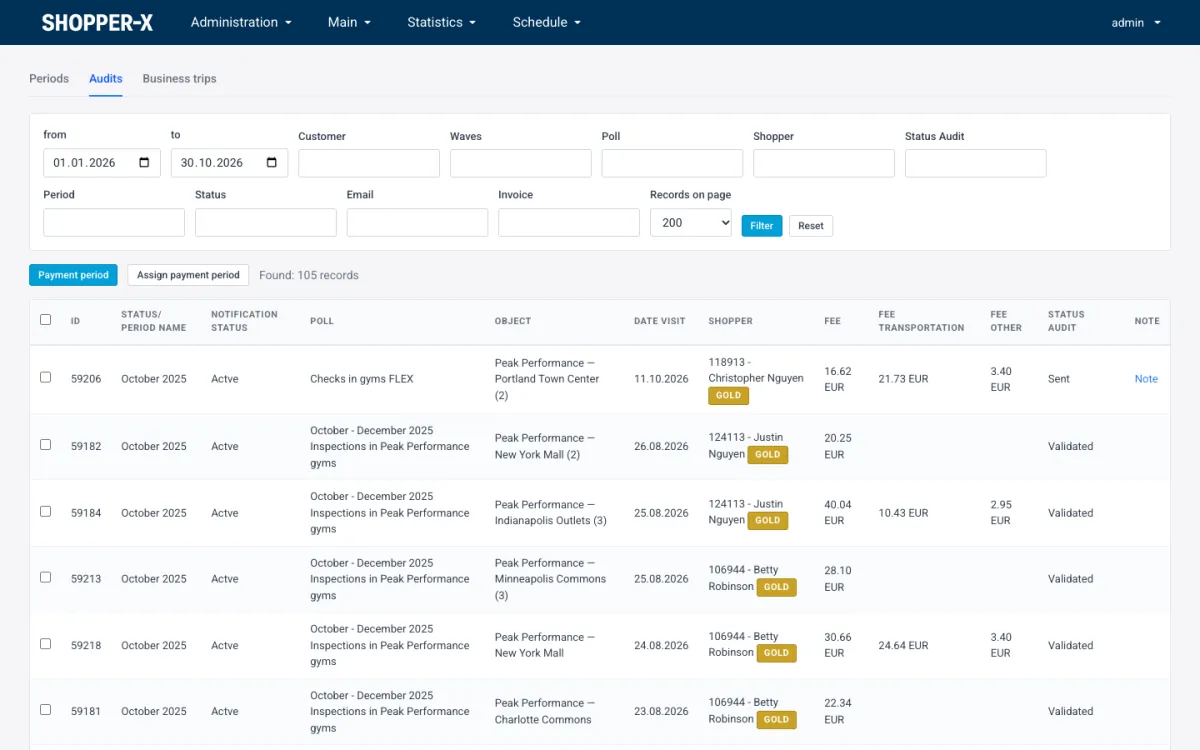
IBANs are validated and written in compact form, without spaces, because many bulk payment tools reject "BG80 BNBG 9661 1020 3456 78" and accept "BG80BNBG96611020345678". There is no direct bank integration; the formats banks accept differ by country and by bank, and a spreadsheet with clean IBANs loads into any of them. The file goes to the bank portal or into payroll. Before uploading, check that the row count matches the shoppers you expect, no row has an empty IBAN, and the total equals the sum of the detailed sheet.
What the shopper sees
The shopper enters an IBAN and an account holder once, in the profile; those fields are encrypted at rest, together with the personal number and ID card data. Each month the shopper fills in a declaration of insurance status and payment account, on the web or in the mobile app, and the declaration month is recorded on the payment period. On the web dashboard the shopper sees the completed shops with their scores, the fee for each, and the business trips; the fee notification email closes the loop. Pay reliability is the cheapest retention measure an agency has; the post on recruiting and retaining shoppers puts it next to the others.
Edge cases
A report is validated after the period closed. It goes into the next period. Do not reopen a completed period to squeeze one audit in; the exported file would no longer match what was paid.
A shopper changes the IBAN mid-month. Fix one rule and publish it: the IBAN in the profile on the export date is the one that gets paid. Never edit an IBAN in the spreadsheet by hand; change the profile and export again.
A fee was changed after the audit was assigned. A bulk edit in the schedule or a correction in the report head changes the amount on the audit, and the revision history shows who changed it and when. Make such changes before the period is completed; afterwards, the correction is an extra line in the next period with a note naming the audit.
Currency. EUR is the default on every fee field; BGN is supported for programs in Bulgaria. Keep one currency per period and per bank file.
Billing the client from the same export
The per-client and per-wave sheets are the invoice basis. The clients sheet gives the total paid out per customer; the other-fees sheet gives the reimbursed purchases per customer and wave, which most contracts bill at cost on top of the audit price. At EUR 35 per audit, a wave of 80 audits is invoiced at EUR 2,800 plus the other-fees sheet for that wave, EUR 552 if every visit had the EUR 6.90 purchase. Payout and billing come from one file, exported once, and never drift apart.
FAQ
How often should we pay mystery shoppers?
Monthly, on a fixed date, for the previous month's validated visits. Weekly runs multiply the admin work by four; a date shoppers can count on does more for retention than speed.
Can one audit sit in two payment periods?
No. An audit belongs to one period, and the payment list shows that period on the row. A correction after the period closed is a new line in the next period.
Do we pay for a rejected visit?
Not for an unacceptable report. A returned report is paid once the corrected version is accepted. A visit the shopper could not complete through no fault of their own, a closed store for instance, is a policy decision; many agencies pay the transportation fee but not the visit fee, and say so in the brief.
Related reading
- Shopper payments in Shopper-X: periods, business trips and the export, screen by screen.
- Mystery shopping report validation checklist
- How to recruit mystery shoppers and keep the good ones
To see a full month, from the schedule to the exported bank file, with your own fee structure, request a demo.