
The mystery shopping questionnaire builder in Shopper-X is where an agency administrator turns a client's visit scenario into a form that shoppers fill in on the web or in the mobile app. Questions come from a shared bank, sit in sections and carry a weight. A question can require a photo or a comment of a minimum length, and a questionnaire can require a passed qualification test before fill-in opens. The same rules are checked at submission, on the web and in the app.
A mystery shopping questionnaire is a scenario with rules
Each questionnaire belongs to one customer and one wave. On the general settings tab the administrator sets the name, a description, the working time of the visit, the shopper's fee, the start and end dates, and a separate validation end date that gives reviewers time after the last visit. Two optional attachments shape who can take the job: a qualification test the shopper must pass first, and an instruction file. An ad-only flag publishes the audits as ads for shoppers to apply to instead of assigning them directly. Qualification gates (city, age, car, driving license) limit who may apply or be assigned. They do not pick the shopper; assignment happens in the schedule.
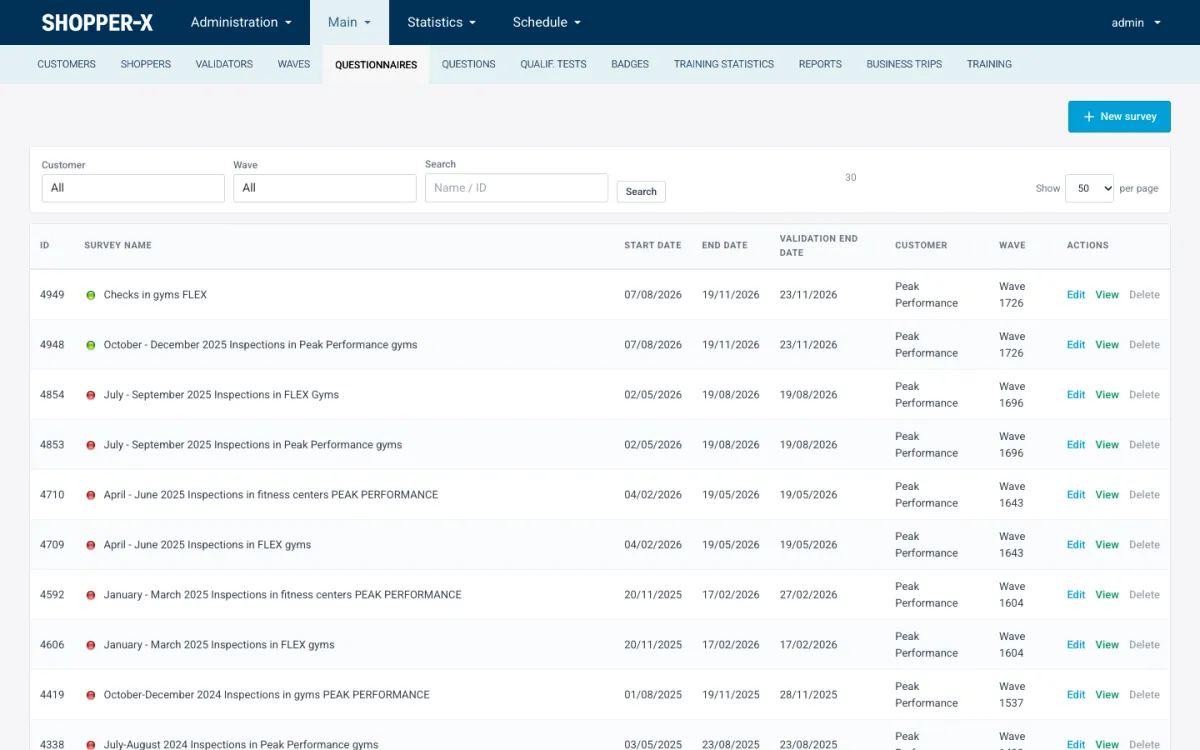
The questionnaire list shows every scenario with its dates, customer and wave, and a dot for active or inactive. Filters by customer and wave plus a name or ID search keep a long history usable.
The question bank and sections
Questions are not typed into each questionnaire. They live in a shared question bank and are added to a questionnaire from there, so a question used for a gym chain in one quarter can be reused for the next quarter or for another client. Inside a questionnaire, questions are grouped into sections (question groups), with optional blocks below a section when a client wants a finer breakdown.
Two shortcuts save most of the setup time. "Copy questions from another questionnaire" pulls a whole set, with sections and per-question settings, into a new scenario. "Clone" duplicates an entire questionnaire, settings included, which is the usual way to start the next wave.
Five question types
The question bank supports five types, each for a different kind of fact:
- Yes/no for presence or absence: was the shopper greeted, was the receipt offered.
- Points for a judged scale with a maximum result, for example 1 to 5 for the quality of the sales argument.
- Single choice for one option from a fixed list.
- Multiple choice for several options from a fixed list.
- Open text for narrative: the description of the visit, times, amounts.
Option lists for the choice types come from property values, which the administrator manages in one place and which are also used for shopper profile fields. A shopper cannot add an option while filling in. Open text answers are not scored.
Weights and the running sum
Every question in a questionnaire has a weight, entered in the question row of the "Survey questions" tab. The tab header shows the sum of weights and updates as you type, so an over-weighted section is visible before the first visit, not after the client questions the score. The demo questionnaire "Checks in gyms FLEX" has 48 questions whose weights add up to 1.
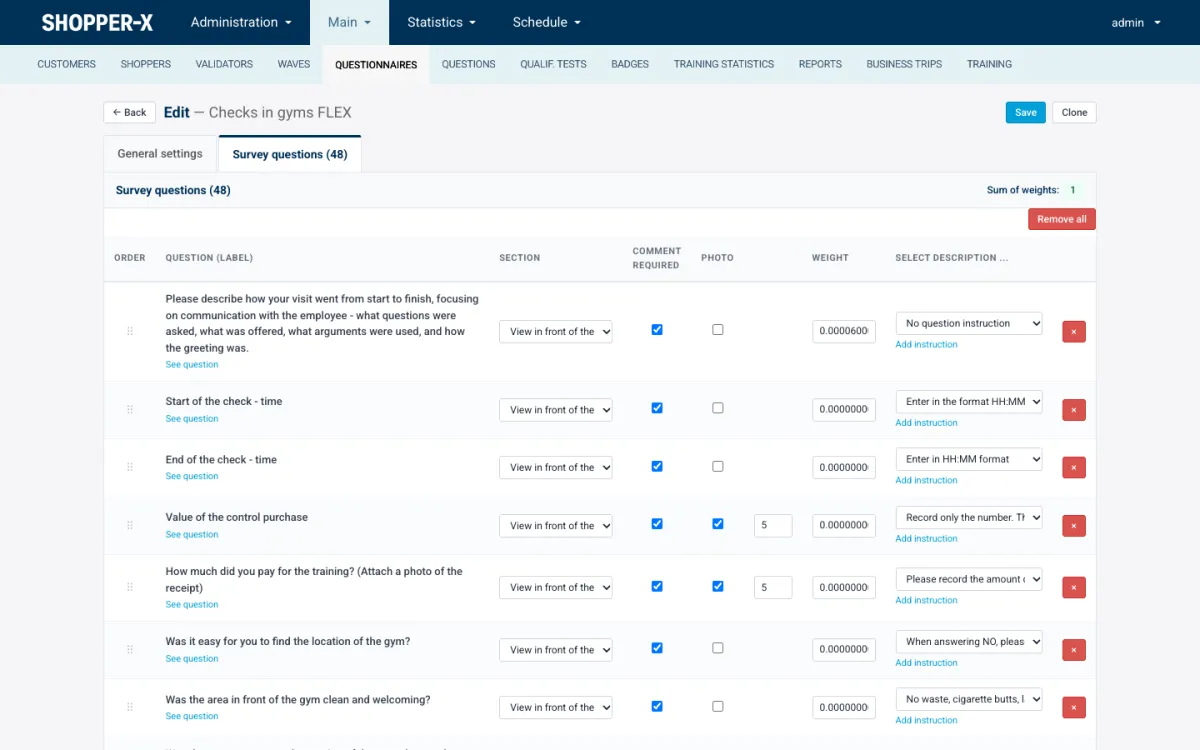
The same row holds the section, the comment-required checkbox, the photo checkbox with a count, and the instruction text chosen for the shopper.
Rules that protect the score
A questionnaire is also a set of evidence rules. They are stored on the question and enforced at submission, before a validator opens the report.
Critical and disqualifying questions
A critical question is checked at submission; use it for the facts the client cannot do without. A disqualifying question goes further: a wrong answer disqualifies the whole report. Keep both lists short. A scenario with ten disqualifiers mostly produces failed reports. The questionnaire design guide covers when to use each.
Required photos with a count
Ticking "photo" on a question makes an upload mandatory and the count field says how many files. The demo asks for five photos of the control purchase and five of the training receipt. The shopper cannot submit with fewer. The count is the only per-question photo rule; file size and type limits are set per client.
Comment required, minimum length, comment on the maximum result
"Comment required" forces a text comment next to the answer. A minimum comment length rejects one-word comments and shows the reviewer an "Enough symbols" check with the character count. "Comment required when the maximum result is given" targets the common pattern of a shopper awarding full points without saying why.
Private data, hide in export, numbered, reset result
Four smaller flags cover the rest. "Contains private data" marks questions whose answers hold personal information. "Hide in export" keeps an internal question out of the client's Excel and PDF files. "Numbered" shows a number before the question. "Allow reset result" permits the recorded result on that question to be reset.
Instructions for the shopper inside the questionnaire builder
Each question row has a "select description" field where the administrator picks an instruction text, for example "Enter in HH:MM format" or "When answering NO, please explain". The text is shown to the shopper under the question in both the web form and the app. Longer material goes into tutorials: PDF, Word or PowerPoint documents attached for shoppers and opened in an in-browser Office viewer.
When the brief must be learned rather than read, the questionnaire can require a passed instruction test. A test is an instruction document plus multiple-choice questions; the default pass mark is 90%, and each course can set its own mark, a question draw count and a timer before the test unlocks. A shopper who fails can retake the test at once. Until the test is passed, fill-in for that questionnaire stays closed.
Same validation on web and in the app
Shoppers submit from the web form or from the iOS and Android app with the same account. Submission validation runs the same rules in both places: required answers, required photos and their counts, minimum comment lengths, disqualifying and critical questions, and the contract and monthly declaration gates. In the app, answers and photos are kept on the phone as drafts and synced; each photo is uploaded individually, and when a rule fails the server returns the failing question so the shopper lands on it instead of searching a 48-question form.
From questionnaire to score
The structure built in the editor is the structure the client reads. On the statistics dashboard every section becomes a segment of the overall score ring. In the "By questions" view each section is a row that expands to its blocks and questions, with one column per wave or per day and a color band set by thresholds the user saves once. The "show problematic" toggle hides everything above the threshold.
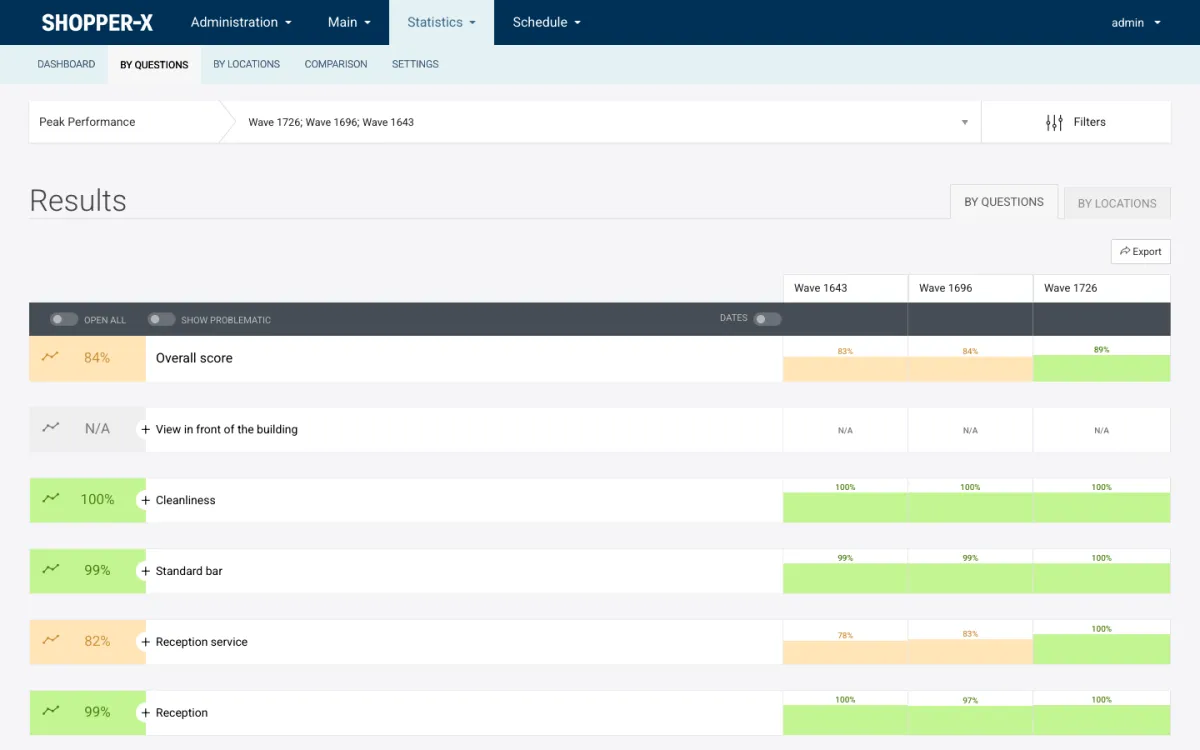
Any view exports to XLSX, PDF or HTML with the charts embedded. This is why section names deserve care: "Reception service" at 82% is a sentence the client can act on, "Section 4" is not.
Related features
- Mystery shopping software: the full platform overview, module by module.
- Report validation: how validators grade the reports these questionnaires produce.
- Scheduling: assigning the questionnaire's audits to locations and shoppers.
FAQ
Can I reuse questions across clients?
Yes. The question bank is shared. Add a bank question to any questionnaire, copy a set from another questionnaire, or clone a whole questionnaire and change the customer and wave.
Can one wrong answer fail the whole report?
Yes, if the question is flagged as disqualifying. The report is disqualified at submission; the validator can still read it and return it for corrections.
How many photos can I require?
A count per question. Tick "photo" and enter the number; the shopper cannot submit with fewer files on that question.
Can a shopper see the instruction while filling in?
Yes. The instruction text chosen for the question appears under it in the web form and the app, and tutorials open in the browser without a download.
Request a demo and we will build one of your own scenarios in the editor and walk you through it.