
Fees live on the audit
Shopper-X pays shoppers from the same system that schedules the visits and validates the reports. There is no separate payroll list to keep in sync. Every audit in the schedule carries its own fee, transportation fee, other fee and currency. By the time a report is validated, the amounts are already on the record. The payment list is a view of the audits that have not been paid yet.
An administrator sets fees in two places. In the schedule, the bulk edit action changes the fee on many audits at once, together with status, shopper, visit dates and custom fields. A wave of eighty visits at the same rate is priced in one step. In the report head, the shopper's pay, the other fee and the currency sit next to the confirmation and the internal notes, so a single visit can be corrected during review when the scenario required an extra purchase or a longer route.
The three amounts stay separate all the way to the export. The fee is the pay for the visit. The transportation fee covers travel. The other fee covers anything else, usually a required purchase. An accountant can treat reimbursements differently from pay without pulling the numbers apart by hand.
Payment periods
A payment period is the unit payouts are grouped in. Usually there is one per month. A period is either active or completed. The administrator assigns audits and business trips to it and exports it. When the period is marked completed, the administrator sends the fee notification email to every shopper in it.
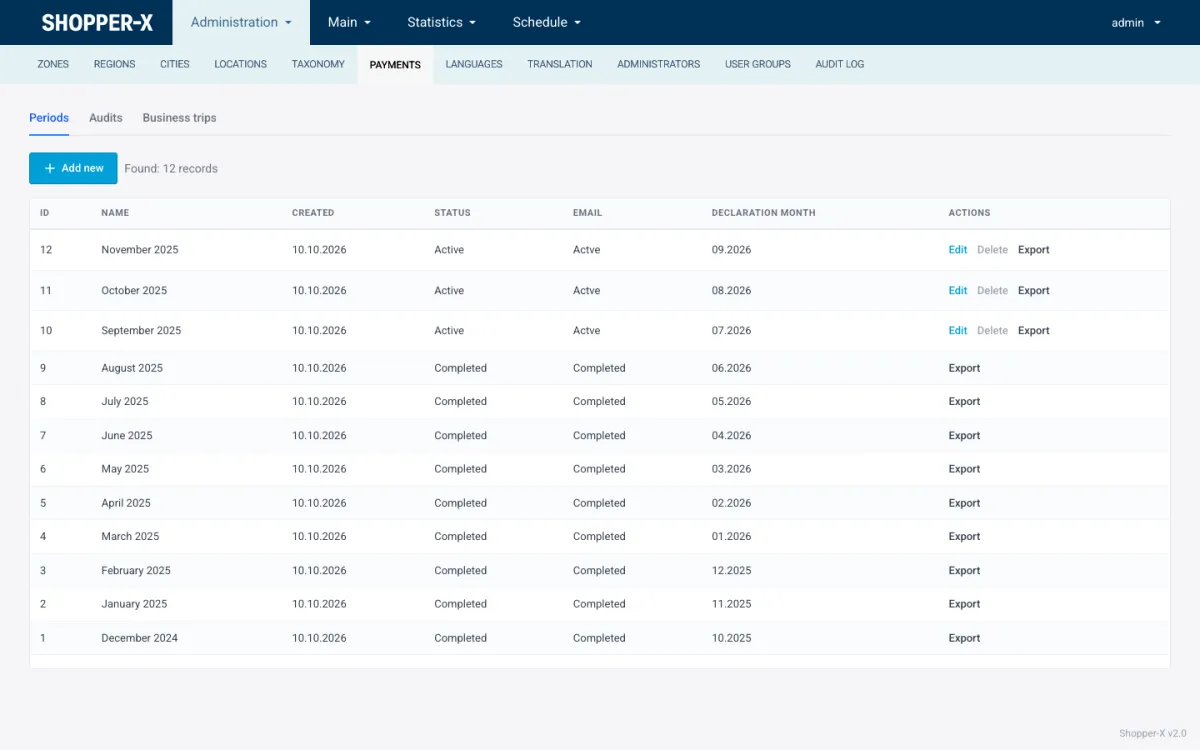
The list shows each period's name, creation date, status, whether the notification email has gone out, the declaration month it relates to, and the actions. An active period can be edited, deleted or exported. A completed period can no longer be edited or deleted. It can still be exported, so the file can be regenerated for the accountant at any time.
Who does what: an administrator whose user group includes the payments permission creates the period, assigns the audits, exports the file and sends the email. Validators work in the report queue and do not need this screen. Clients never see fees. The client role sees the reports and statistics of its own brand and nothing about what the shopper was paid.
The audit payment list
The Audits tab under Payments lists every audit in a date range with its fees. The filters are the ones used across the admin: from and to date, customer, waves, questionnaire, shopper, audit status, period, period status, email status and invoice. Each row shows the audit ID, the period it sits in, the notification status, the questionnaire, the location, the visit date, the shopper with the rating badge, the fee, the transportation fee, the other fee with its currency, the audit status and a note.
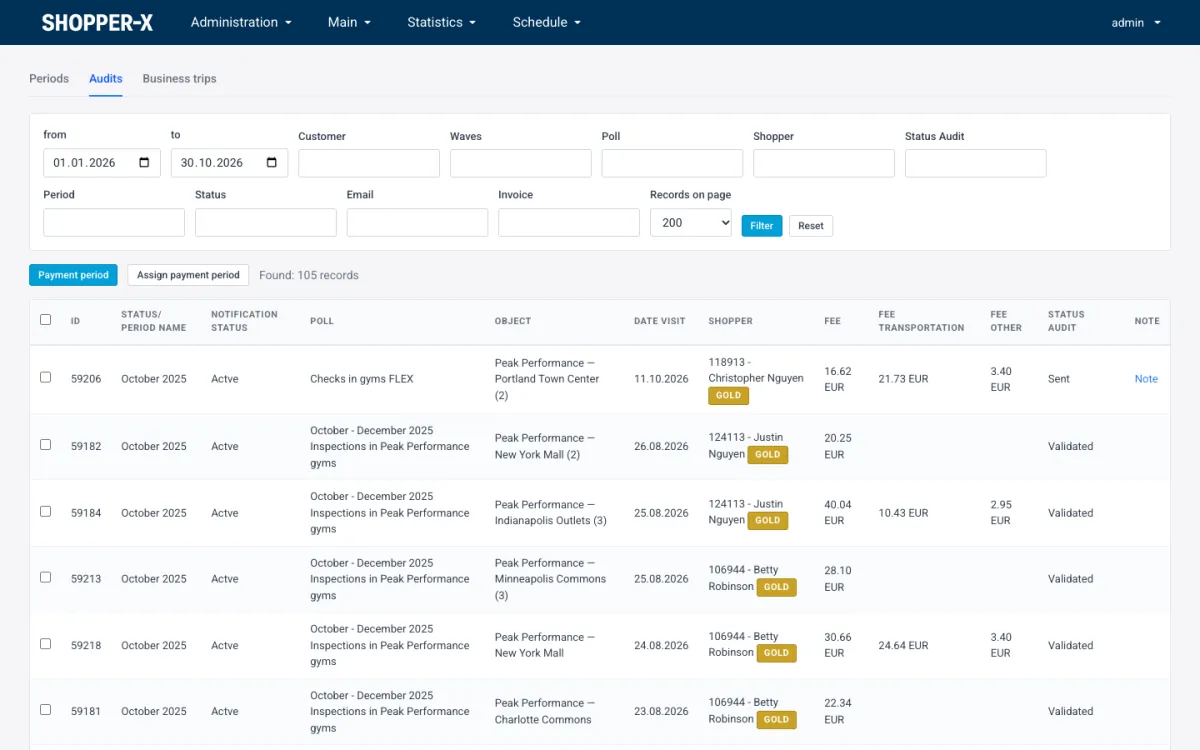
The monthly routine is short. Filter by the month and by the audit status you pay for. Look at the rows where the transportation or other fee is filled, since those are the ones that need a receipt or an explanation. Tick the rows, or select them all, and use the assign action to put them into the open period. Rows that already belong to a period show the period name, so a shopper is not paid twice for the same visit by accident. The note column is for the administrator, for example a reference to the invoice a shopper sent.
Period export
Export produces one XLSX workbook. You choose which parts to include, and the full file has these sheets:
- Pay summary
- Transportation
- Other fees per client and wave
- Clients
- Detailed
- Business trips
The pay summary is the sheet the accountant works from. The transportation and other-fee sheets keep reimbursements apart from pay, and the per-client-and-wave split shows which customer each extra cost belongs to. The detailed sheet has one line per audit for anyone who needs to check a single amount.
Each shopper's IBAN comes from the profile. IBANs are validated and written into the export in compact form, without spaces, ready for a bank's bulk payment import. There is no direct bank integration. The accountant loads the pay summary into the bank's bulk payment tool or into payroll. That is a deliberate limit: the file formats banks accept differ by country and by bank, while a spreadsheet with clean IBANs works everywhere.
Business trips
When several visits happen on one journey, the shopper groups those audits into a business trip instead of claiming transport on each audit. A trip has dates, a transportation type (car, public transport or other), fuel consumption and fuel cost for a car, the route legs, and receipts uploaded as files. The shopper submits it and an administrator approves it. Approved trips are assigned to a payment period like audits and appear on the business trips sheet of the export.
Each trip can be exported as a PDF, which is the document to file with the receipts. The Business trips tab lists all trips and exports the list to XLSX. Once a trip is completed it is locked and can no longer be changed, so the PDF and the export always agree. Business trips can be switched off for an agency that pays a flat transportation fee per audit and does not need trip-level expense records.
The shopper's side
The shopper enters payment details once, in the profile: IBAN and account holder. These fields are encrypted at rest, together with the personal number and ID card data. Each month the shopper fills in a declaration of insurance status and payment account, on the web or in the mobile app, which shows the same form. The declaration month is recorded on the payment period, so the administrator can see which declaration a payout relates to.
On the shopper dashboard the shopper sees the completed shops with their scores, the fees, and the business trips when they are enabled. The fee notification email sent from the period tells the shopper that the period has been processed. Profile editing stays on the web; the app links to it.
Unacceptable and returned reports
The payment list filters by audit status. Reports marked unacceptable or returned for corrections can be left out of the period until the review is settled.
Currencies
EUR is the default currency on every fee field. BGN is supported for programs run in Bulgaria, where the system started. The currency is stored per audit and shown in the list and in the export. Other currencies have not been set up yet. If you pay shoppers in another currency, ask before you buy.
Related features
- Mystery shopping software for agencies and brands: the whole platform, from waves to the client dashboard.
- Shopper management: profiles, contracts, qualification tests and the rating tiers shown as badges in the payment list.
- Report validation: the review step that decides which audits reach the payment list.
FAQ
Can I pay travel costs separately from the visit fee?
Yes. Each audit has a transportation fee next to the visit fee, and the export puts transportation on its own sheet. For multi-visit journeys, business trips collect the route legs, fuel and receipts in one record that an administrator approves.
How does a shopper know a period was paid?
When the administrator sends the fee notification from the period, every shopper in it receives an email. The periods list shows whether that email has gone out, and the shopper dashboard lists the fees.
Can one audit sit in two payment periods?
No. An audit is assigned to one period. The payment list shows the period name on each row, and the period filter lets you check what an older period contained.
Which bank format does the export use?
XLSX, with IBANs validated and written in compact form. There is no direct bank integration; the accountant imports the pay summary into the bank's bulk payment tool or into payroll.
Request a demo with your own fee structure and we will walk through a full month, from the schedule to the exported file.