
Validation software has one job: make sure the client never reads a report that nobody checked. In Shopper-X that job belongs to the validator, a separate role with its own queue and editor. This page covers what the validator sees, what the validator can do to a report, which rules stop a weak report before it is submitted, and how the review feeds the shopper's rating.
Why a validator sits between the shopper and the client
A client logs in and sees one row per completed and validated visit. Nothing else. A report just submitted, one sent back for corrections, one marked unacceptable: none of these reach the client's report list. The validator decides when a report is good enough to count.
The validator role is narrow on purpose. It gets the report queue, the report editor with every answer and file, the score, accept, return for corrections, client remarks and export. It does not manage the schedule, the questionnaires, the shoppers or the payments. An agency can hand review work to a part-time reviewer without opening the rest of the system.
The report queue
Reports are listed per customer, wave and questionnaire. The header shows three counts: received, validated and not validated. That is the validator's to-do list. A search box and a date range narrow the list. A separate "unacceptable" tab holds reports rejected outright so they do not clutter the queue.
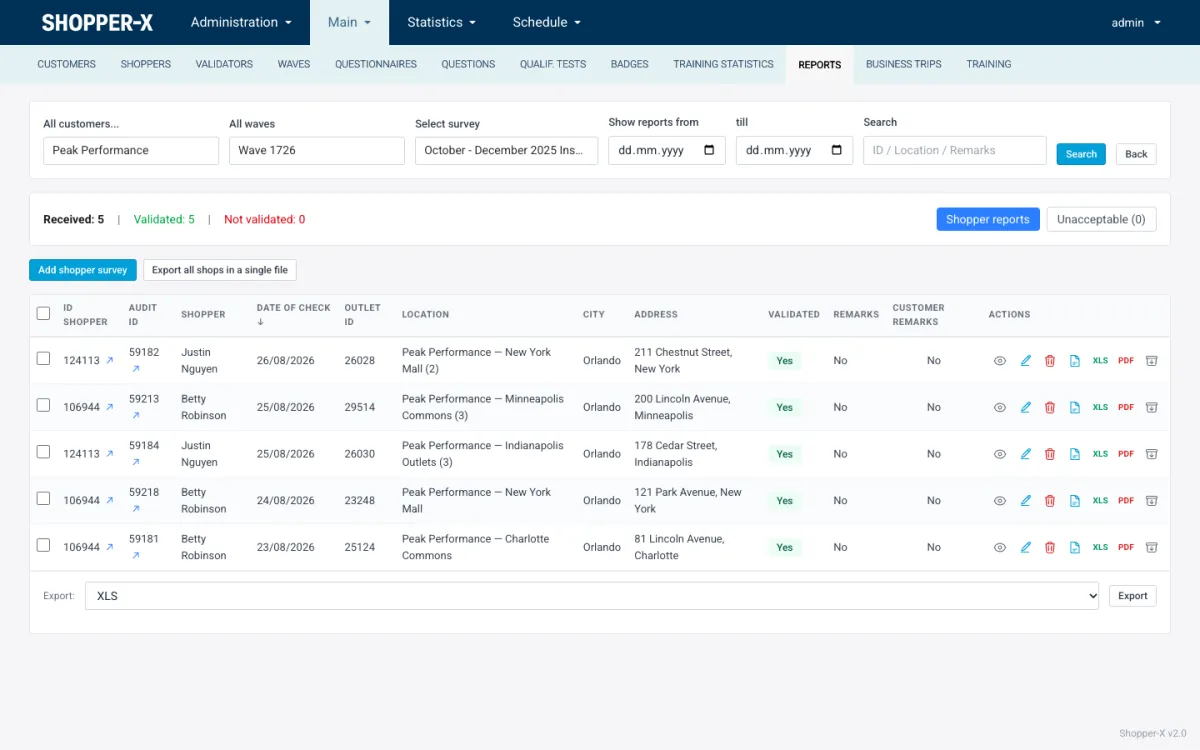
Each row shows the shopper, audit ID, date of the check, outlet, city, address, the validated flag and whether remarks exist. Per row: view, edit, delete, export to XLSX, PDF or HTML, and download every attached file as a ZIP. Administrators also get JSON. Selected reports export together as one ZIP, and all reports of a questionnaire can go into one Excel file (the "all cards" export) for a client that wants raw data.
Inside a report
Head fields
The top of the report holds what the agency needs to settle the visit, not what the client sees: confirmation, the shopper's pay with its currency, other fee, internal notes, a "return for corrections" control, who last edited the report, the shopper, the location, and the date and time of the visit.
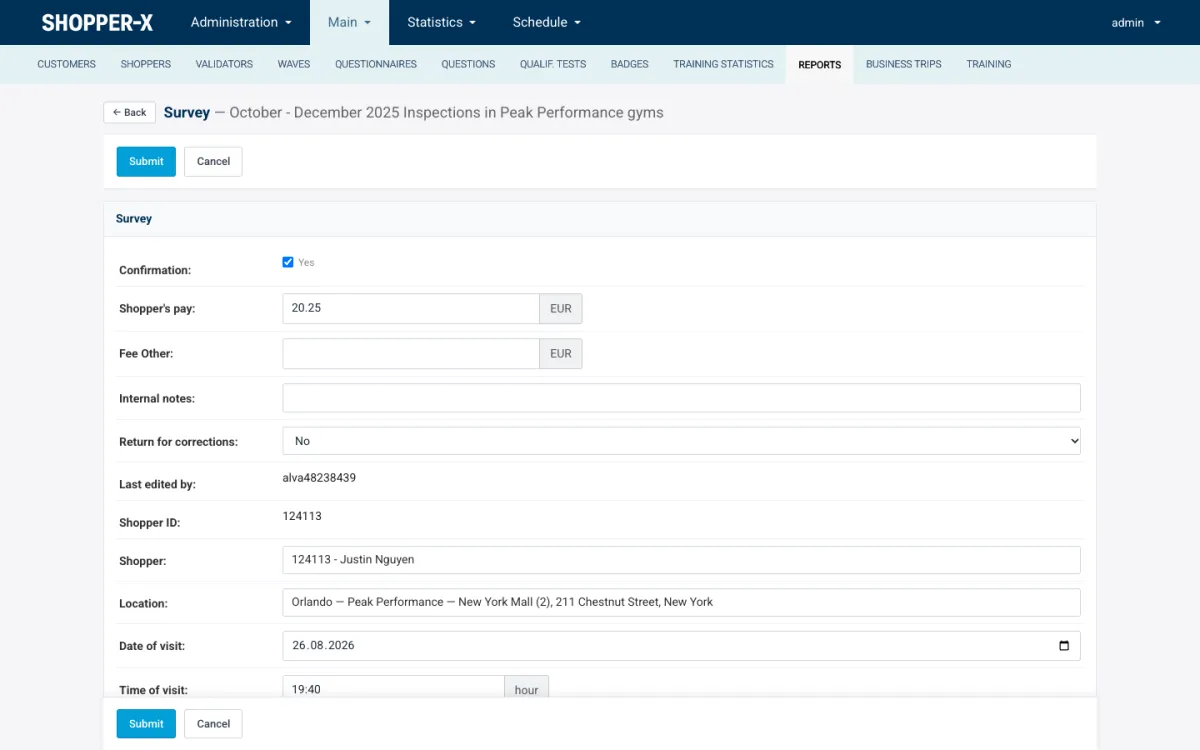
The pay and other-fee fields are the audit's fees. The payment module lists the same fees per audit when a payment period is put together, so a fee reduced for a late visit is changed here. Internal notes stay inside the agency.
Every answer, with its evidence
Below the head the report lists every question under its section. Each answer shows the chosen option or text, the attached photos and files, and for text answers a character count against the minimum set in the questionnaire, labeled "Enough symbols" when the shopper met it.
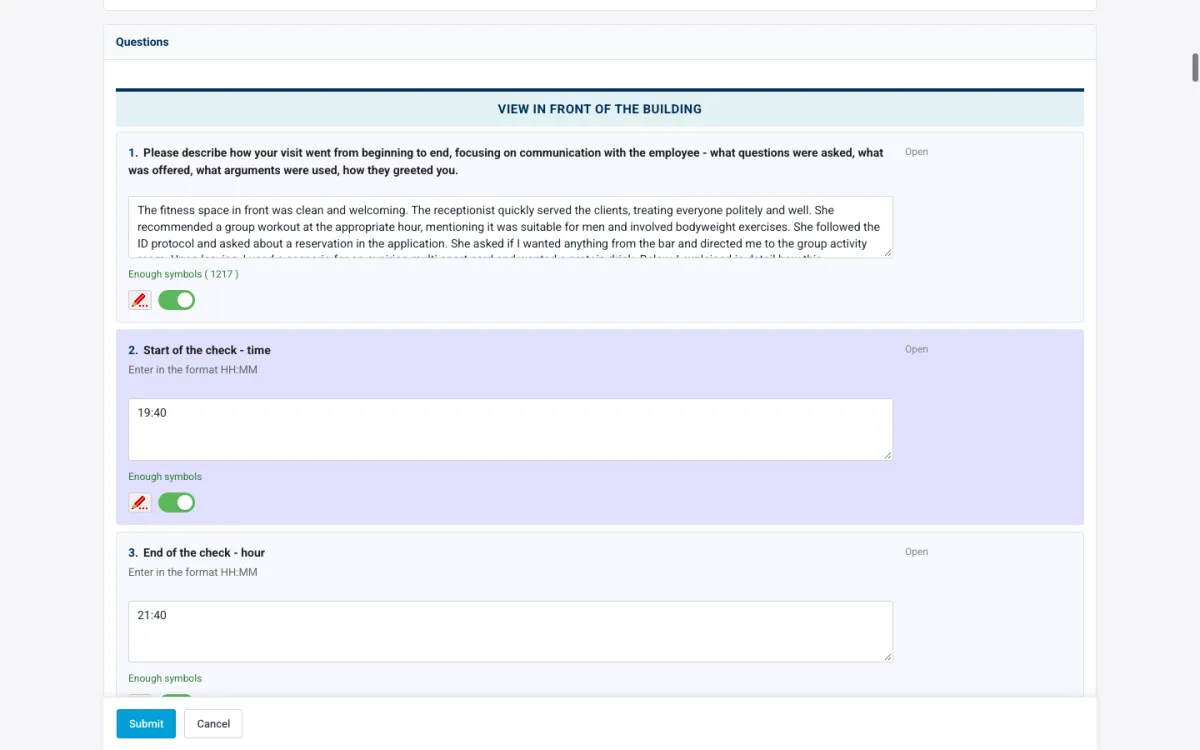
Two controls sit next to every answer. An accept toggle marks the answer as checked. A remark pencil opens a note to the shopper about that question, so the feedback says "the photo of the entrance is missing" instead of "please fix the report".
Validator actions
- Save a validator score. The score on the four criteria described below, stored with the report.
- Mark as validated. From this moment the report appears in the client's individual reports.
- Add a client remark. Saving it emails the text to the shopper, who does not need to log in to learn that something is wrong.
- Return for corrections. The report goes back to the shopper, who sees an Edit button on the audit in the inbox and in the mobile app, fixes what the remarks name, and resubmits. The audit status shows "returned" until the report comes back.
- Mark as unacceptable. For a report that cannot be repaired: wrong location, wrong day, invented content. It leaves the queue for the unacceptable tab and the client never sees it.
- Unlock. Releases a report another reviewer opened and left without closing.
What stops a weak report before it arrives
Most quality control happens before a validator opens anything. The questionnaire defines the rules and the fill-in form enforces them on submit:
- Required answers. A report with an unanswered question does not submit.
- Required photos, with a count per question. Two required photos means two files or no submission.
- Minimum comment length per question, and a comment forced on the maximum result, so a perfect score always comes with a reason.
- Disqualifying questions: one wrong answer fails the whole report. Critical questions carry their own flag so a wrong answer on them stands out.
- Contract and declaration gates: a shopper without a signed contract or the current monthly declaration cannot submit.
The same rules run on the web form and in the iOS and Android app. The app keeps drafts and photos on the phone and syncs them. When the server rejects a submission it names the failing question, so the shopper fixes it on the spot.
One limit to know before you buy: Shopper-X does not record GPS coordinates during a visit. Proof that a shopper was in the store comes from the required photos, the time-of-check answers, the comment lengths and the validator reading the report against the scenario.
Scoring the shopper from the validation
Every validated report gets a score on four criteria: scenario (did the shopper follow the visit script), report (is the writing complete and usable), evidence (are the photos and files what was asked for) and timeliness (were the visit and the submission on time). Default weights are 40, 30, 20 and 10 percent, adjustable per questionnaire through weight profiles.
| Criterion | Default weight |
|---|---|
| Scenario | 40% |
| Report | 30% |
| Evidence | 20% |
| Timeliness | 10% |
The shopper's average across validated reports sets a rating tier: Bronze below 70, Silver from 70 to 90, Gold at 90 and above. The tier shows as a badge next to the shopper's name, and Gold shoppers are offered new work first. Score feedback can be emailed to the shopper from a template. More on tiers on the shopper management page.
Locks, logs and wording help
Report locks. Two reviewers cannot edit the same report at once. The lock shows who is inside. If that person walks away, the lock expires on its own, and it can be released earlier with the unlock action.
Audit log. Every status change, score and remark is logged with who did it and when. Administrators review the log when a client asks why a report was accepted or a shopper disputes a score.
Wording help. A validator writing remarks for forty reports a day runs out of polite phrasing. A draft remark or comment can be sent to an AI text service and the suggested wording comes back for the validator to accept or edit. That is the whole feature. It does not score reports.
Related features
- Mystery shopping software for agencies and brands: the whole platform in one page, from schedule to client reporting.
- Questionnaire builder: where the photo counts, comment lengths, critical and disqualifying flags are set.
- Reporting and the client portal: what the client sees once a report is validated.
FAQ
Can a report be sent back more than once?
Yes. A resubmitted report lands in the queue again and can be returned again. Each return is a logged status change, so the history of a report that went back twice is visible.
Does the shopper see the validator's score?
The shopper's dashboard lists completed shops with their scores, and score feedback can be emailed from a template. The internal notes in the report head are not shown to the shopper.
What does "unacceptable" do?
It moves the report to the unacceptable tab and sets the audit status to unacceptable. The report is kept for the record but is never shown to the client.
Can two validators work on one report?
Not at the same time. The lock lets one person in and shows the other who it is. An administrator can unlink a scored report from its validator so someone else re-validates it.
To see the queue and the editor with anonymized demo data, or to talk through your validation process and get a quote, request a demo.