
Most mystery shopping questionnaires fail the same way. They are long, every question counts the same, and the number at the end means nothing to the store manager who gets it. This guide shows how to design a mystery shopping questionnaire that produces a score a client can act on: sections that follow the visit, one question type per fact, weights with a worked example, and the evidence rules that keep the report honest. The screens are from Shopper-X; the method works in any tool.
Start from the scenario, not from the questions
Write the visit script first: walk in, ask about one product, let the employee sell, buy something small, leave. Then write down what the client will decide when the wave is over: whether to retrain the sales staff, whether the promotion was mentioned, whether the checkout queue is a problem. Every question has to feed one of those decisions. If it does not, cut it.
In Shopper-X the scenario sits on the questionnaire itself: name, description, working time, the shopper's fee, start and end dates, and a validation end date that gives reviewers time after the last visit. Who may take the job is set here too (city, age, car, driving license), and whether a qualification test must be passed first.
Sections that follow the visit
Group the questions in the order the shopper experiences them: outside, entry, service, checkout, exit. The shopper fills in the form in the order of the visit, which cuts mistakes. And a section is a reporting unit: in the statistics each section gets its own percentage, its own segment on the overall score ring and its own row in the "By questions" grid. A client who reads "Service 59%, Checkout 68%" knows where to look. A client who reads "68% overall" does not.
Keep it to five or six sections. Shopper-X allows blocks below a section for a finer split, for example Service into "Needs analysis" and "Product presentation". Add a block only when the client will act on it separately.
Choose the question type per fact
Shopper-X has five question types. Pick the type by the kind of fact, not by habit.
- Yes/no for the presence or absence of a behavior: was the shopper greeted within 30 seconds, was the receipt offered. Most questions on a good questionnaire are yes/no: easy to prove, easy to validate.
- Points for a judged scale with a maximum result, for example product knowledge from 1 to 5. Use them sparingly.
- Single choice for one answer from a list where each option carries a value. Waiting time: under one minute (2), one to three minutes (1), over three minutes (0). The highest option is the maximum.
- Multiple choice for several answers from a list, each with a value. The maximum is all options selected.
- Open text for narrative only: the description of the visit, the time of entry, the receipt amount. Open text carries no score. See the trap below.
Weights: a worked example with 25 questions
Weights are simpler than most tools make them look. Each scored question has a weight. A section's score is the sum of (result divided by maximum, times weight) over its scored questions, divided by the sum of those weights. The overall score is the same calculation over the whole questionnaire. The scale does not matter, only the share. The example below uses weights that add up to 100, so each weight reads as a percentage of the overall score. It is a retail visit with one shopper's answers.
| # | Question | Type | Weight | Sample answer | Points |
|---|---|---|---|---|---|
| Outside (10 points) | |||||
| 1 | Facade and sign clean and intact | yes/no | 3 | yes | 3 |
| 2 | Opening hours posted and match the visit | yes/no | 2 | yes | 2 |
| 3 | Entrance area free of litter | yes/no | 2 | no | 0 |
| 4 | Impression from the street, 1 to 5 | points | 3 | 4 of 5 | 2.4 |
| 5 | Describe what you saw outside | open text | 0 | text | not scored |
| Section score | 7.4 of 10 = 74% | ||||
| Entry (15 points) | |||||
| 6 | Greeted within 30 seconds | yes/no | 5 | yes | 5 |
| 7 | Greeting included eye contact | yes/no | 3 | yes | 3 |
| 8 | Staff identifiable by uniform or badge | yes/no | 3 | yes | 3 |
| 9 | Store clean and tidy on entry, 1 to 5 | points | 4 | 5 of 5 | 4 |
| 10 | Time of entry (HH:MM) | open text | 0 | 10:42 | not scored |
| Section score | 15 of 15 = 100% | ||||
| Service (40 points) | |||||
| 11 | Employee asked what you needed | yes/no | 6 | yes | 6 |
| 12 | Employee asked at least one follow-up question | yes/no | 4 | no | 0 |
| 13 | Product knowledge, 1 to 5 | points | 8 | 3 of 5 | 4.8 |
| 14 | Recommended a specific product | yes/no | 6 | yes | 6 |
| 15 | Mentioned the current promotion | yes/no | 4 | no | 0 |
| 16 | Waiting time: under 1 min (2), 1 to 3 min (1), over 3 min (0) | single choice | 6 | 1 to 3 min | 3 |
| 17 | Topics covered: price (1), warranty (1), delivery (1) | multiple choice | 6 | price, delivery | 4 |
| Section score | 23.8 of 40 = 59.5% | ||||
| Checkout (25 points) | |||||
| 18 | Checkout open with at most two people waiting | yes/no | 5 | yes | 5 |
| 19 | Receipt offered without asking | yes/no | 6 | yes | 6 |
| 20 | Cashier mentioned the loyalty program | yes/no | 4 | no | 0 |
| 21 | Cashier polite, 1 to 5 | points | 6 | 5 of 5 | 6 |
| 22 | Purchase amount (photo of the receipt required) | open text | 0 | 24.90 | not scored |
| Section score | 17 of 25 = 68% | ||||
| Exit (10 points) | |||||
| 23 | Thanked and said goodbye | yes/no | 5 | yes | 5 |
| 24 | Would you come back as a customer | yes/no | 5 | no | 0 |
| 25 | Time of exit (HH:MM) | open text | 0 | 11:07 | not scored |
| Section score | 5 of 10 = 50% |
Overall: 7.4 + 15 + 23.8 + 17 + 5 = 68.2 of 100, so 68.2%.
Two things to notice. The overall score is not the average of the five section percentages (that would be 70.3%). Service carries 40 of the 100 points because that is what the client wants to change, so a weak Service section pulls the overall down more than a weak Exit section. And the three open-text questions appear in no denominator at all.
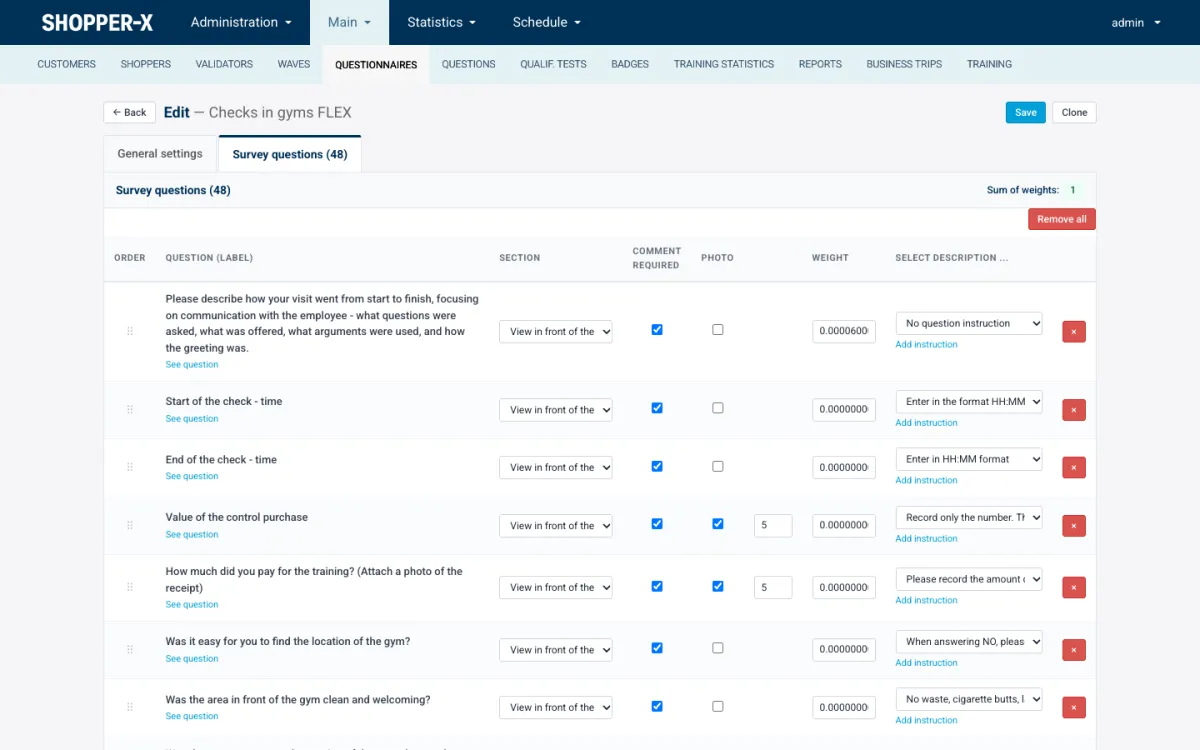
In the Shopper-X editor every row shows the section, whether a comment is required, whether a photo is required and how many, the weight, and the instruction text the shopper sees. The "Sum of weights" indicator updates as you type. The demo questionnaire in the screenshot sums to 1; the example above sums to 100. Only the share counts.
The free-text trap
The most common scoring bug in mystery shopping is an open-text question inside the denominator. Take the Exit section above: two yes/no questions and one text question. The shopper answered yes, no, and wrote the exit time. A tool that counts all three and treats the text answer as zero reports 33% for Exit. The correct figure is 50%. Across 200 visits the ranking of locations shifts for no reason.
Shopper-X leaves open-text questions out of both the numerator and the denominator, whatever weight is typed next to them. Answers the shopper marked as not available are left out the same way, so a question that could not be observed does not count as a failure. Still, give open-text questions a weight of zero. The running sum then shows only the scored questions, which is the number you are tuning.
Critical and disqualifying questions
A critical question protects a section. If the shopper answers it with zero (a "no" or the lowest option), every other scored question in the same section is reset to zero. When the section is split into blocks, only the questions in the same block are reset. Use it when one failure makes the rest of the section meaningless: "Did an employee approach you at all?" If nobody did, the product-knowledge grade cannot be anything but zero.
A disqualifying question protects the whole report. A zero answer resets every scored question in the questionnaire to zero and labels the answers as disqualified. Use it for the rule the client cares about more than the score: an age check skipped before selling alcohol, a legal disclosure that was never made.
Keep both under five per questionnaire. Each one turns a graded report into a pass or fail, and ten of them produce a wave of zeros nobody can read a trend from. Name them in the instruction text.
Evidence rules
A score is only as good as the proof behind it. Three settings per question do most of the work, and Shopper-X enforces them at submission on the web form and in the mobile app alike.
- Required photo with a count. The receipt, the facade, the promotion stand. Set how many photos the shopper must attach; the form does not submit without them.
- Minimum comment length. For the narrative question and for every points question. For the visit description, 300 to 500 characters is a workable minimum.
- Comment required on the maximum result. A 5 out of 5 is the grade shoppers give when they are in a hurry; a required comment gives the validator something to check.
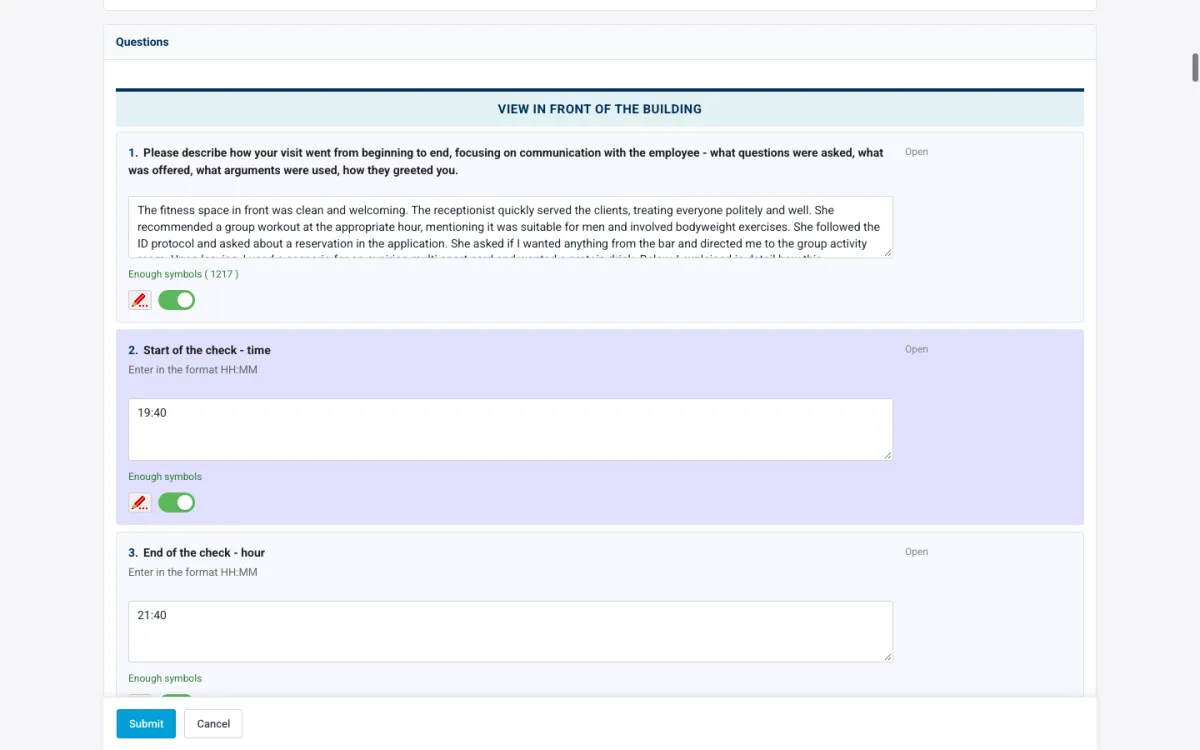
This is what the validator sees. The narrative answer shows "Enough symbols (1217)" in green, so the length rule was met. Under every answer there is an accept toggle and a remark pencil. If a comment is thin, the validator writes a remark and returns the report for corrections; the shopper gets an Edit button and resubmits. A report that fails the evidence rules never reaches the client, because clients see validated reports only. Shopper-X has no GPS check. The photo count, the comment length and the validator are the controls.
Instructions and the qualification test
Every row in the editor has a "select description" field: the instruction text the shopper sees under the question. "Enter in the format HH:MM" under the time questions. "Record only the number" under the purchase amount. "When answering NO, describe what happened" under a critical yes/no. Write one for every question that has ever been misread. They cut the returns for corrections.
For the scenario as a whole, attach an instruction document (PDF or Word) and a multiple-choice test. A questionnaire can require a passed test before the shopper may fill in a report for it. The default pass mark is 90%, each course sets its own, and a failed test can be retaken at once. The point is that the person who walks into the store knows what "greeted within 30 seconds" means before the first visit, not after the first returned report.
Checklist before the wave
Ten yes/no questions for your own questionnaire. A "no" is cheaper to fix now than after 200 visits.
- Does every question feed a decision the client has named?
- Are the sections in the order of the visit, six or fewer?
- Is open text used for narrative only, never for a scored fact?
- Do open-text questions carry a weight of zero?
- Does the sum of weights match your target, with the largest share on what the client wants to change?
- Are there fewer than five critical and disqualifying questions, named in the instructions?
- Does every points question require a comment, with a minimum length and a comment on the top grade?
- Does every claim that needs proof require a photo with a count?
- Has every question that was ever misread got an instruction text?
- Has one test report been submitted on the web and one in the app, and did the validator read both?
FAQ
How many questions should a mystery shopping questionnaire have?
Enough to cover the decisions the client has named and no more. Twenty to forty is typical for a retail visit of 15 to 20 minutes. Beyond that, shoppers answer from memory.
What is a good overall score?
There is no universal figure. A score compares locations and waves on the same questionnaire. Agree the red, yellow and green thresholds with the client before the first wave; in Shopper-X they are saved per user and applied to every chart. The KPIs guide covers what to read into the number.
Can I reuse a questionnaire for the next wave?
Yes. Clone it, set the new dates and wave, and keep the questions. Questions live in a shared bank and can be copied from another questionnaire. Change weights between waves only with the client's agreement, or the trend line breaks.
The editor settings in this guide are described on the questionnaire builder page, and the reviewer's side on the report validation page. For the rest of the platform, see what Shopper-X does. To try the method on your own scenario, request a demo and bring your questionnaire; we will set it up with you and run a test report on the web and in the app.