
Shopper-X is mystery shopper management software for agencies that recruit, train and pay their own panel. Shoppers register themselves, pass a qualification test and wait for an administrator to approve them. The same account then works on the website and in the iOS and Android app. This page covers what the shopper does and what the administrator sees.
Recruitment
Self-registration
A new shopper opens /register, confirms the email address, adds a profile photo and takes a qualification test. The account stays "waiting approval" until an administrator approves it. Passing the test does not approve the account on its own; the agency decides who gets work. All other roles are created inside the admin.
The shopper profile
The profile holds what is needed to match a shopper to an audit and to pay them afterwards:
- personal data and permanent address
- payment details (IBAN and account holder)
- education, employment, industries worked in, marital status, children
- shopping area coverage: home city plus the areas the shopper can travel to
- driving license and cars (make, year, fuel)
- relationships with companies, used to pre-screen users and non-users of a brand
- an opt-in for notifications about available ads
Coverage area, car and license feed the eligibility rules in the schedule. Once the shopper signs the contract, the identity fields lock.
Contract and monthly declaration
The contract is signed once, online, with a PDF copy the shopper can download; old contracts can be archived when the terms change. Each month the shopper fills in a declaration of insurance status and payment account, on the web or in the app. Both are submission gates, checked on the server for web and app alike.
The shopper database
The admin shopper list is where the day-to-day work with the panel happens. Filters cover name, ID, phone, email, note, status, city, the customers a shopper has reported for, contract, driving license, car, overall assessment, minimum shops assessed, registration date and last check. Four sliders narrow the list by instructions followed, turnaround, quality of photos and questionnaire score.
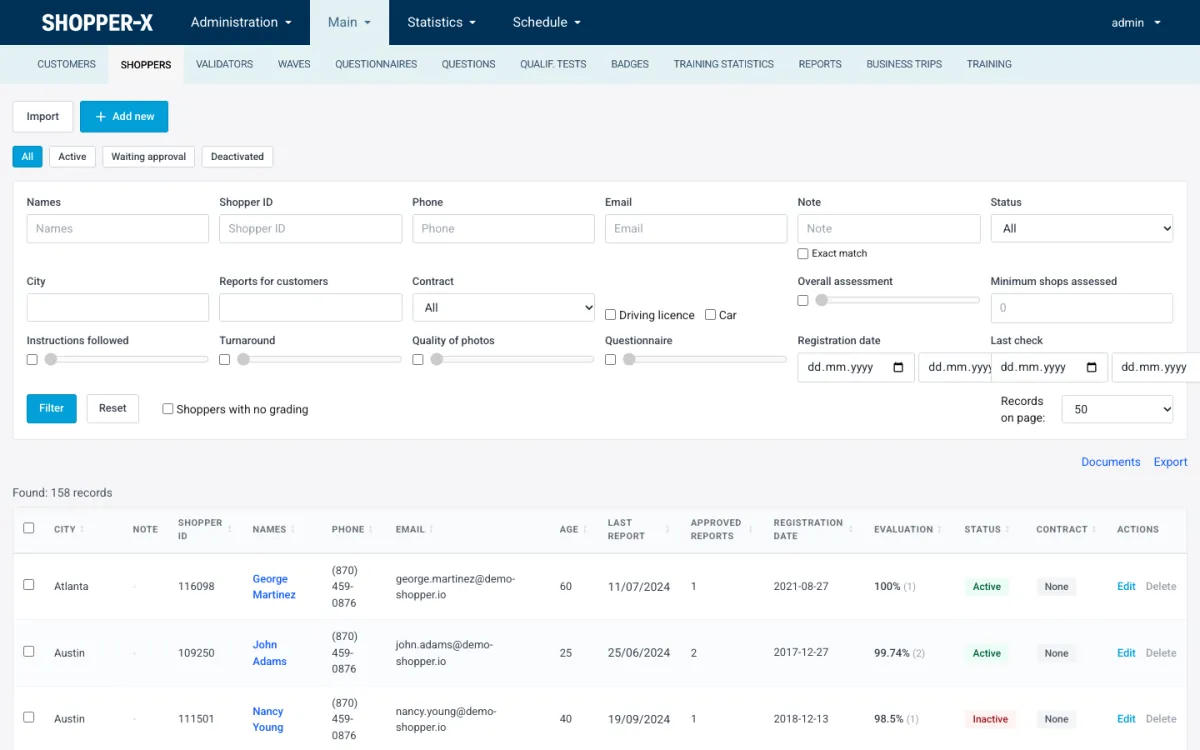
Each row shows city, note, shopper ID, names, phone, email, age, last report, approved reports, registration date, evaluation percentage, status and contract. From the list an administrator can create and edit shoppers, activate or deactivate them singly or in bulk, impersonate a shopper to see exactly what they see, keep private notes, store documents, and open scores, payments and business trips. The list imports from and exports to XLSX, so an existing panel loads in one go. Clients never see it. The administrator can keep a restricted-shoppers list per client, and those shoppers are not offered that client's audits.
Mystery shopper training and certification
Three training levels
Training is built from instruction tests: a document (PDF, DOC or DOCX) plus multiple-choice questions, on three levels.
| Level | Purpose | Pass mark and validity |
|---|---|---|
| Entry ticket | General onboarding for every new shopper | 100% required, valid 12 months |
| Industry qualification | Raises the shopper's standing for one industry | Valid 6 or 12 months |
| Task instruction | Per client and scenario, tied to a questionnaire | Set per course |
A questionnaire can require a passed task instruction before the shopper may fill in its reports. Without the pass, the shopper cannot open the form.
Settings per course
The default pass mark is 90%. Each course can set its own mark, how many questions are drawn from its pool per attempt, a waiting time before the test opens, and whether an outstanding test blocks fill-in. A failed test can be retaken immediately.
Certificate states and expiry
Every shopper has one certificate per course. Its state is one of missing, assigned, failed, withdrawn, expired, outdated or valid. A certificate expires by date, or it becomes outdated when the course content changes version. When the instruction document is replaced with a new version, the old certificates stop counting without anyone revoking them by hand.
Badges
Badges are rules an administrator defines on a metric over an industry and a time window, for example "top 5 by average validator score in the last quarter". A scheduler re-evaluates the rules and re-awards the badges, so they reflect current performance.
Training statistics
A training statistics page shows tests sat, pass rate, average score and retakes, broken down by project and by shopper. It also shows which scenarios give shoppers the most trouble.
Rating tiers
Each validated report gets a score on four criteria: scenario, report, evidence and timeliness. The default weights are 40, 30, 20 and 10, and a questionnaire can use a different weight profile. The validator sets the score in the report editor; the average across reports places the shopper in a tier.
- Bronze: below 70
- Silver: 70 to 90
- Gold: 90 and above
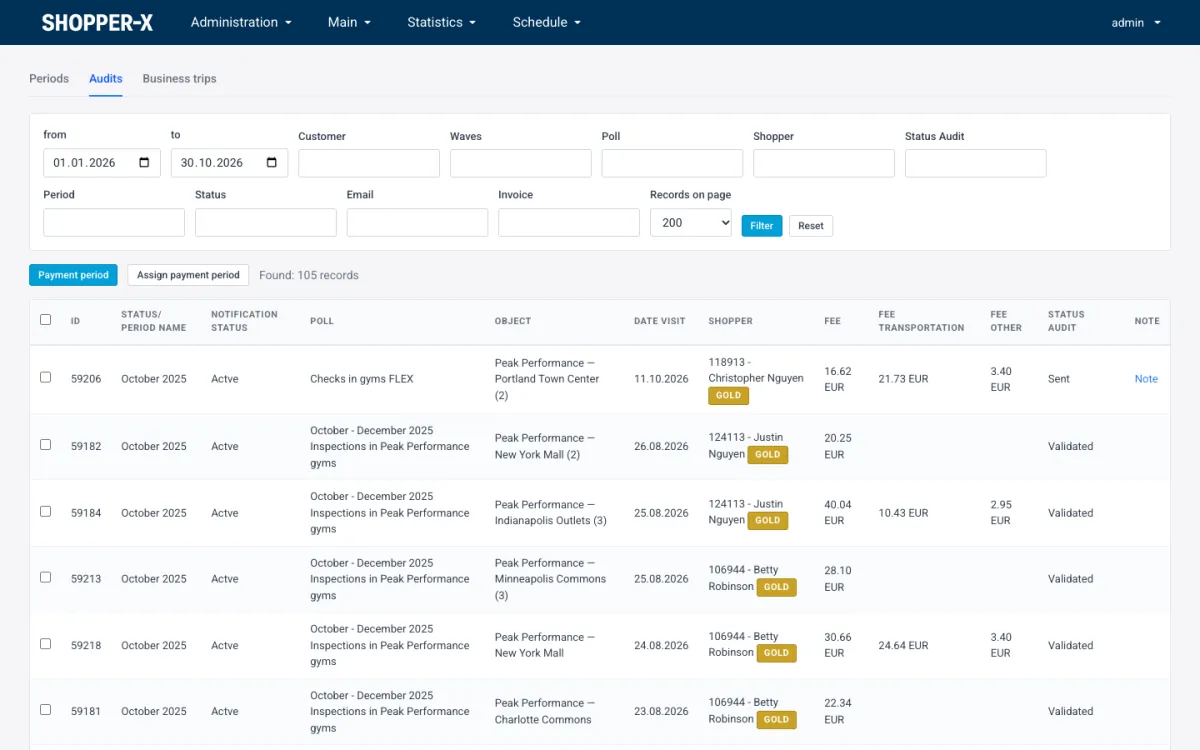
The tier shows as a badge next to the shopper's name throughout the admin, including the payment lists. It drives allocation priority: Gold shoppers are offered work first. Score feedback can be emailed to the shopper from templates.
Ads, applications and the inbox
An audit can be published as an ad. Shoppers browse available ads, filter by city or questionnaire, and apply with a proposed visit date and a comment. Eligibility is enforced on the server: the shopper's working area, the client's restricted-shoppers list and the questionnaire's gates (age, car, license). A shopper who does not qualify cannot apply.
Shoppers see their own applications and can withdraw them. Administrators see all applications per wave and bulk-assign from them in the schedule. Once assigned, the audit lands in the shopper's inbox with a reaction deadline. The shopper accepts with a visit date or rejects with a reason. Accepted audits can be filled in, edited after a return for corrections, moved to another date, or rejected. One rule applies everywhere: no rejection and no rescheduling when the visit is less than two days away. Email notifications go out for assignments, status changes and date changes; every email text is editable as a translation string.
The mobile app
The shopper app runs on iOS and Android with the same account as the website. It covers the inbox (accept, reject and reschedule with the same rules as the web), available ads, applications, the questionnaire fill-in, qualification tests and the monthly declaration.
Answers and photos are kept on the phone as drafts and synced to the server. Each photo is uploaded on its own, so one failed upload does not lose the others. On submit the server runs the same validation as the web form (required answers and photos, minimum comment lengths, disqualifying and critical questions, contract and declaration) and names the failing question. This is not a full offline mode: submitting needs a connection, but a report can be filled in with poor signal and sent later.
Profile editing and training documents stay on the web; the app links there. Updates are gated by a version manifest, so an outdated app must update first. The download page at /app lists the current version and release notes.
Personal data
Personal numbers, ID card data and IBANs are encrypted at rest. Administrators can be limited to a subset of screens through user groups, and every permission check is written to an audit log.
Related features
- Mystery shopping software for agencies and brands: the whole platform in one page.
- Shopper payments: fees per audit, payment periods, business trips and the bank export.
- Scheduling: waves, audits, eligibility rules and bulk assignment from applications.
FAQ
Do shoppers register themselves?
Yes, at /register with email confirmation, a photo and a qualification test. The account stays "waiting approval" until an administrator approves it.
Can a shopper take a job without the training?
Only if the questionnaire does not require a test. A questionnaire can require a passed test before fill-in, and each course decides whether an outstanding test blocks it.
Does the app replace the website for shoppers?
For the visits, yes: inbox, ads, applications, fill-in, tests and the declaration work in the app. Profile editing and training documents are on the website.
How are Gold shoppers chosen?
By the average validator score on four criteria (scenario, report, evidence, timeliness). 90 or more is Gold, 70 to 90 is Silver, below 70 is Bronze. Gold shoppers are offered work first.
Want to see the shopper database, training and rating tiers with your own program? Request a demo.