
Most guides on how to choose mystery shopping software start with a feature grid. This one starts with the month the spreadsheet broke. The worked example is an agency running about 150 audits a month for three clients, with two project managers, one part-time validator and around 60 active shoppers. It runs on a shared spreadsheet for the schedule, an online form for reports and a second spreadsheet for payments. That setup worked for two years. The question is what it costs now, and what to ask vendors so the replacement fits the way the work is actually done.
When the spreadsheet stops working
Four incidents from the example agency, all inside one quarter.
- Two people edited the schedule at once. One project manager moved twelve visits to the next week while the other assigned shoppers to the same rows. The second save overwrote the first. A shopper turned up at a store whose visit had been moved.
- A shopper was paid twice. A rescheduled visit was entered as a new row and the old row was never deleted. Both reached the payments sheet. The overpayment was 35 EUR; finding it took an afternoon.
- A report reached the client before review. The client had a link to the form responses. A report with two missing photos and a one-line comment was read by a regional manager before anyone at the agency had opened it.
- A photo could not be found. The client disputed a shelf finding. The photo had arrived by email as IMG_4411.jpg and was filed by someone who had since left. Thirty minutes of searching, then an apology.
Now add the recurring cost. At 150 audits a month, assigning and chasing shoppers takes roughly two minutes per audit, so about five hours. Renaming and filing around 600 photos takes another five. Reconciling the schedule against the payments sheet is a day at month end. That is close to three working days a month moving data between tabs, before any incident.
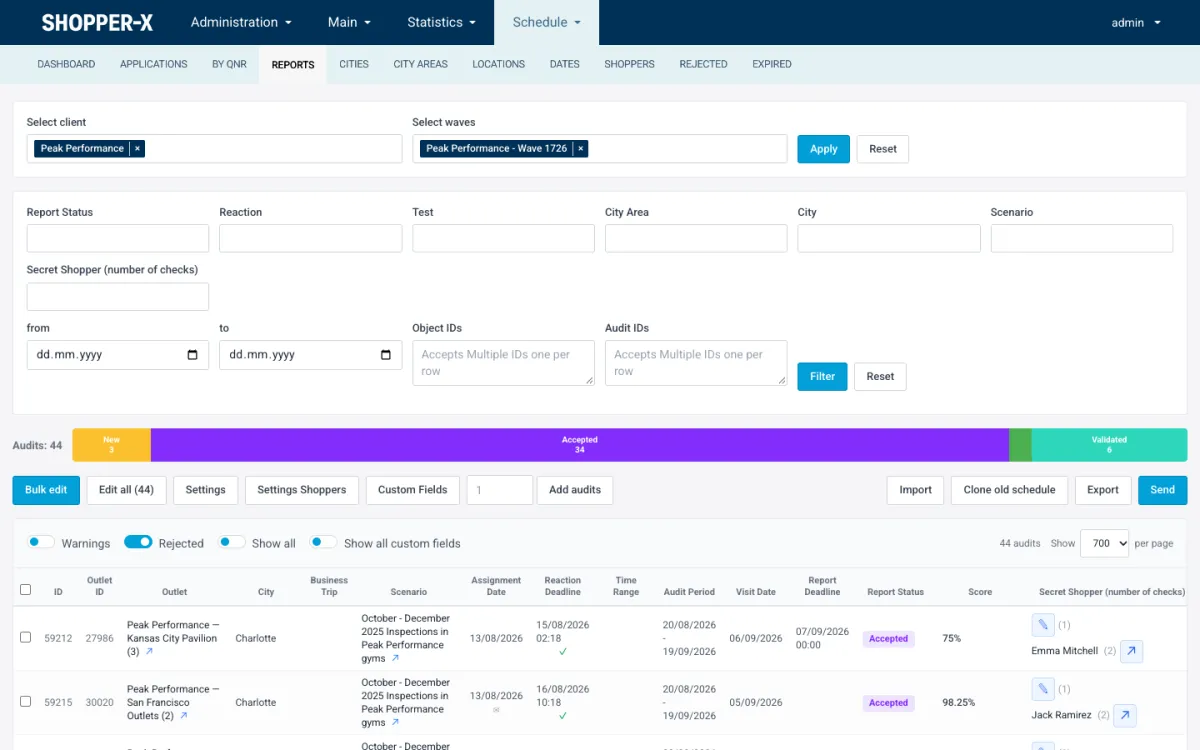
The screenshot shows one schedule row in a purpose-built system: location, scenario, assignment date, reaction deadline, visit window, report deadline, status, score and shopper. A spreadsheet can hold the same columns. It cannot enforce them, lock them or remember who changed them.
Map the workflow before the demo
Vendors demo what looks best. You should score what you do most. Before any demo, write down the seven stages and what breaks in each one today:
- Wave: the campaign, its dates, its questionnaires.
- Schedule: who visits which location, when, with what deadlines.
- Brief: the scenario and instructions the shopper reads.
- Visit: answers and photos on the phone.
- Validation: someone reads every report before the client does.
- Payment: fees, expenses, a monthly run.
- Client report: what the client sees, exports and shares.
Give each stage a weight that reflects your pain, then score every vendor from 0 to 3 per stage. The example agency weighted scheduling and validation highest because those produced the incidents. The table is a template with made-up scores for two vendors:
| Stage | Weight | Vendor A | Vendor B |
|---|---|---|---|
| Wave setup | 10 | 3 | 3 |
| Schedule | 25 | 3 | 1 |
| Brief | 10 | 2 | 3 |
| Visit (shopper app) | 15 | 2 | 3 |
| Validation | 20 | 3 | 0 |
| Payment | 10 | 2 | 0 |
| Client report | 10 | 2 | 3 |
| Weighted total (of 300) | 100 | 260 | 170 |
The total is not the only thing to look at. A zero in any stage means you keep a spreadsheet for that stage, and the hand-offs between a system and a spreadsheet are where the four incidents above come from. Vendor B's polished app does not help if validation and payment stay in Excel.
How to choose mystery shopping software: the checklist by stage
Ask for each item to be shown on screen, not on a slide.
Scheduling
- Bulk edit: change status, shopper, fee and visit dates on many audits at once, and assign shoppers from their applications in one step.
- Clone the last wave: locations, audits and settings copied into the new wave, so a quarterly program does not start from a blank sheet.
- Reaction and fill-in deadlines per wave, tracked separately from the visit date, so you see who has not accepted yet.
- An editing lock: when one planner is inside a client's wave, others see it is locked and by whom.
- Revision history of every audit change, with who and when.
- XLSX import and export of the schedule, because clients send store lists in Excel.
The scheduling page shows how Shopper-X handles each of these.
Questionnaires
- A shared question bank with sections, so the same question is worded the same way across clients and waves.
- Weights with a running sum shown while editing, so the total is checked before the first visit.
- A required photo count per question, not just a photo field.
- Critical and disqualifying questions: a wrong answer flags the report or voids it.
- Per-question instruction text shown to the shopper at the moment of answering.
The questionnaire design guide covers how to use weights and photo requirements.
Shopper app
- Drafts and photos kept on the phone and synced to the server, so a weak signal in a basement store does not lose the report.
- Each photo uploaded on its own, so one failure does not block the rest.
- The same validation rules as the web form: required answers, photo counts, minimum comment length, disqualifying questions.
- Accept, reject and reschedule from the app, under the same deadline rules as the web inbox.
Validation
- A validator role that sees the report queue and editor, and nothing about campaign management.
- Return for corrections: the shopper gets an edit button and re-submits, with the remark attached.
- A report lock, so two reviewers cannot edit the same report at once.
- An audit log of every status change, score and remark.
- Shopper scoring at validation (scenario, report, evidence, timeliness) that drives who is offered work first.
The report validation checklist lists what the validator checks.
Payments
- Payment periods: assign audits to a period, complete it, export it, notify the shoppers in it.
- Expenses per audit (transportation, other fee) and business trips with route, receipts and admin approval.
- An export with a pay summary per shopper and IBANs in the compact form a bank file needs.
Client access
- Read-only client logins scoped to that client's data on the server, not by hiding menu items.
- Exports per report (XLSX, PDF) and all reports of a wave in one file.
- Public report links with an expiry date that can be switched off.
- An API with a key per client, if your clients' IT teams want to pull report data into their own tools.
Administration
- A permission tree per user group, so a junior planner edits the schedule but not payments.
- Languages and translation strings editable in the admin, including every notification email text.
- Encryption at rest of personal data such as ID numbers and bank details.
Questions vendors avoid
Is pricing per user or per audit? Per-user pricing punishes the roles you want more of: validators, client logins, managers. Per-audit pricing tracks your revenue. Ask what counts as an audit: assigned, completed or validated. Shopper-X publishes its price list: a monthly base fee plus a fee per submitted audit, with unlimited users; ask with your monthly audit volume.
Who owns the data? Your schedule, questionnaires, reports and photos should be yours, in a contract clause, not in a FAQ.
Can everything be exported? Not "there is an export". Export the schedule, all reports of one questionnaire, a batch of photos and a payment period during the demo, then open the files.
What happens without a connection? Expect an honest answer. "Full offline" often means a cached form. A credible answer is that answers and photos are saved on the phone as drafts and synced when the connection returns, with the server doing the final validation.
Generic inspection apps versus purpose-built
Checklist and inspection apps are good at what they were built for: a store manager walking the floor with a form. Mystery shopping needs three things they usually lack. Shoppers are paid per visit, so the system needs fees, expenses, periods and a payout export. Reports are read by a client who pays for them, so an external shopper's answers must pass a validator before they become visible. And the client is a separate organization that needs its own login, scoped to its own stores, with exports and share links. Agencies that start on a generic tool rebuild those three parts in spreadsheets, which is where this post began. Brands going the in-house route hit the same wall later.
Run the demo with your own wave
Do not sit through the vendor's demo data. Bring a real questionnaire of 40 to 60 questions with weights and photo requirements, ten locations from one client and three or four shopper profiles. Build the wave, assign the ten audits, fill in one report on a phone with a photo missing and watch what the validator sees. Return it for corrections. Complete a payment period with those audits and open the export. Whatever fails in that two-hour session is what you will keep in a spreadsheet.
Shopper-X has a demo environment with anonymized data: 72 locations, 159 shoppers and 408 completed reports across 24 waves. The seven stages can be walked through there before you book a call; the product overview describes the roles and modules.
Migration
Moving off spreadsheets is mostly three imports. Locations come in as CSV or XLSX with city, region and address. Shoppers come in as XLSX; they still sign the contract and sit the qualification test inside the system. The schedule comes in as XLSX, one row per audit, which is what the spreadsheet already is. Questionnaires are rebuilt once in the editor, a good moment to fix weights and photo counts nobody has reviewed in a year. The example agency ran one wave on both systems, then switched. Budget for that overlapping month.
FAQ
Do we need the mobile app from day one?
No. The web fill-in form applies the same validation rules as the app. Start there and move shoppers to the app once the wave structure is stable.
Can we keep our questionnaire format?
The content, yes; the file, no. Sections, yes/no questions, scored scales, single and multiple choice and open text map onto the question bank, with a weight and a photo count per question. Rebuild it once, then clone it per wave.
Related reading
- In-house vs agency mystery shopping: the brand-side version of this decision.
- How to run a mystery shopping program: the seven stages in order.
- Scheduling in Shopper-X: bulk assignment, wave cloning, locks and history.
To run the walkthrough on your own questionnaire and locations, contact us and we will set up a session.