
Photos are the part of a mystery shopping report that nobody argues with. A photo of an empty shelf at 16:10 on a Tuesday is what it is. This article sets out mystery shopping photo evidence rules: which photos to require, how many per report, when a shopper may skip one, and how the validator checks what arrived. The worked example throughout is a retail wave with one rule: two proof-of-visit photos on every report, one photo per failed criterion, and a cap of eight photos per report.
What mystery shopping photo evidence is for
Two different questions hide under the word "evidence". The first is did the visit happen. The receipt answers that: store, date, time, amount. The second is is the finding true. A photo answers that: the shopper says the promotion stand was empty, and here is the stand.
Do not build the rules around automatic location capture. The controls that hold up everywhere are the receipt time, the photos, and the consistency checks a validator runs between them. Write your rules with that in mind. Every required photo should either prove the visit or prove a finding. If it does neither, it is a cost to the shopper and a file the client will never open.
Three kinds of photo
Proof of visit
The receipt and the storefront. The receipt carries the store name or number, the date, the time and the amount. The storefront photo ties the visit to the address on the audit: the sign, the mall entrance, the unit number. Two photos, on every report, whatever the shopper found. In the retail example these are the two fixed photos.
Proof of a finding
One photo per failed item, not one per question. If 40 scored questions each demand a photo, the shopper spends the visit holding up a phone and the staff notice. If the rule is "photograph what you mark as not met", a clean visit produces two photos and a bad one produces six or seven.
Context
Price tags, a display, the queue, the opening-hours sign. These are not pass or fail items; they let a regional manager understand a finding without visiting. Ask for context photos only where the client has said they will act on them.
Set the count on the question, not on the report
A report-level rule such as "attach at least two photos" is easy to write and hard to enforce. The shopper attaches two blurry photos of anything and the rule is met. Put the requirement on the question instead. In the Shopper-X questionnaire editor each question carries a "photo" setting with a count. "Receipt": photo required, count 1. "Storefront": photo required, count 1. Finding questions keep the photo optional in the editor and the briefing makes it mandatory on a "no" answer, with the validator enforcing it.
A per-question count cannot be bypassed. A shopper cannot submit the report without the required photos. The same rule runs in the mobile app and on the web, because the server validates on submit. When a submission fails, the server names the failing question, so the shopper sees which question is missing its photo rather than a general "something is wrong with your report". That detail saves a validator many emails.
For the retail example: two fixed photos on every report, up to six finding photos on the twelve criteria the client cares most about (stock, price tags, cleanliness, signage, fitting rooms, checkout), cap of eight. If a store fails more than six criteria, the shopper photographs the worst six and describes the rest in the comment.
When a photo would expose the shopper
Bank branches, pharmacy counters, any small shop where the owner is behind the till. Raising a phone there ends the visit as a mystery visit. Your rule sheet needs an honest exit for this case or shoppers will invent one.
Build it as a substitute question rather than a loophole. Pair the finding question with a yes/no question: "Was a photo possible without being noticed?" Set "comment required" on it and a minimum comment length, say 150 characters, so that a "no" must come with a description that stands in for the photo: what the counter looked like, where the sign was, what the price tag said. The minimum comment length is a flag on the question and the validator sees the character count next to the answer, so a thin substitute is visible at a glance. The briefing article has an evidence section that says the same thing in the shopper's language.
Keep the exception narrow. The receipt is never exempt; it is photographed outside. The storefront is never exempt; it is taken from the pavement. The exemption covers photos inside the premises while staff can see the shopper, and nothing else.
Receipts
One clear photo, flat on a surface, with the store identifier, date, time and amount legible. Not the receipt in the shopper's hand on a moving escalator. Say it in the briefing with those words.
The part most rule sheets forget is what the validator does when the receipt time and the reported time differ. A gap of a few minutes is normal: the shopper rounds the arrival time, the till clock is off, the purchase was the last thing before leaving. A gap of an hour is a question. A receipt from a different day is a return for corrections with a remark asking the shopper to explain. The retail example sets a tolerance of 20 minutes between the receipt time and the reported "end of check"; inside it the validator accepts, outside it they ask. Write the tolerance down.
File handling from phone to client
Rules are only as good as the path the photo takes. In the Shopper-X mobile app the shopper attaches photos to the question they belong to while filling in. Each photo is uploaded on its own, so a dropped connection costs one file, not the whole report. Answers and photos are kept on the phone as drafts and synced to the server, so a report started in the car park and finished at home does not have to be typed twice.
On the validator's side the photos appear as thumbnails under their question, so the receipt sits next to the receipt question and the empty-shelf photo next to the stock question. Every file of a report downloads as one ZIP, and the client has the same ZIP per report on their individual reports page. The agency's media library filters all photos by customer, city, location, wave, questionnaire and date, with bulk download of up to 200 files. Upload limits (file size and types) are set per client; put the size limit in the briefing.
How the validator checks photos
Three comparisons on every report, about two minutes once the habit is there.
- Receipt time against reported time. Open the receipt thumbnail, read the time, compare it with the start and end of check answers. Apply the written tolerance.
- Storefront against the location address. Does the sign, unit number or mall entrance match the location on the audit?
- Photo against answer. For each failed criterion, does the photo show what the answer says? "Promotion stand empty" with a photo of a full stand is either the wrong photo or the wrong answer, and both need a remark.
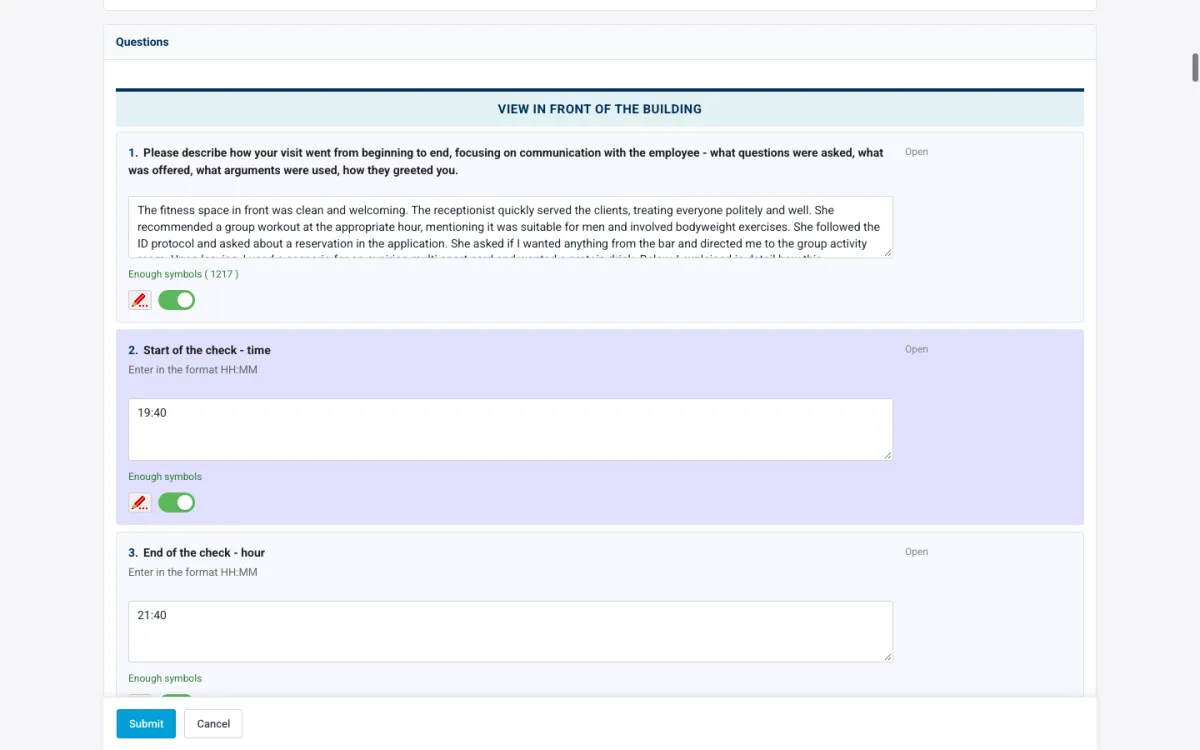
In the report editor each answer has an accept toggle and a remark pencil. The toggle records that the validator has checked the answer. The pencil opens a remark that is emailed to the shopper, so "the receipt photo is unreadable, please attach a sharper one" goes to the person who can fix it. If the report must come back, "return for corrections" gives the shopper an Edit button and the report re-enters the queue on resubmit. The full sequence is in the validation checklist; the photo checks above are three of its steps.
Privacy
No faces of staff and no faces of customers. Say it in the briefing, repeat it in the question's instruction text, enforce it at validation. A cashier's face adds nothing to a finding about the queue and creates a problem for the client the moment a staff member asks to see the report. Where a person is unavoidable, the shopper photographs from behind or waits.
Some photos must exist and still should not travel. A receipt can show the last digits of a card; a form at a bank counter can show a name. Two question flags cover this, "contains private data" and "hide in export". Set both on those questions, then export one report and open the client's XLSX, PDF and ZIP to confirm the file stays with the validator and does not travel.
Example rule sheet
The retail example, written the way it goes into the questionnaire and the briefing.
| Question | Photo required | Count | When it may be skipped |
|---|---|---|---|
| Receipt | Yes | 1 | Never |
| Storefront on arrival | Yes | 1 | Never |
| Promotion stand stocked | If answered no | 1 | Staff within sight; substitute comment of 150+ characters |
| Price tags on featured items | If answered no | 1 | Same |
| Fitting room clean | If answered no | 1 | Never (no staff present) |
| Checkout area tidy | If answered no | 1 | Staff within sight; substitute comment |
| Queue length | Optional | 1 | Always; context only |
| Any question | Cap | 8 per report | Beyond the cap, describe in the comment |
Only the two fixed photos carry "never" without a condition. Everything else is tied to a failed answer or marked optional, so a clean store produces a two-photo report and nobody asks why a passing visit has no pictures.
FAQ
Can a shopper submit a report without the required photos?
No. When a question is marked photo required with a count, the report cannot be submitted until that many files are attached to it. The check runs on the server, so it is the same in the app and on the web.
Photos on every report, or only on reports with failures?
Every report carries the proof-of-visit photos; in the example that is the receipt and the storefront. Finding photos go only with failed criteria. A report with zero failures and two photos is the normal case, not a suspicious one.
Does the platform take video?
Shoppers attach photos and documents per question. If a scenario needs a recording, it is not part of the report, and the briefing should say so together with the legal position in the country of the visit.
Related reading
- A report validation checklist for mystery shopping
- How to brief mystery shoppers
- Report validation in Shopper-X
To see the per-question photo count, the accept toggle and the media library with your own questionnaire, request a demo and we will walk through a wave with you.