
Shopper-X is car dealership mystery shopping software for agencies and importers that audit a dealer network: sales visits, service visits and the follow-up after the shopper has left. A dealership program is small in locations and strict in casting: a dealer network is a short list compared with a store chain, each dealer is visited a few times a year, and the shopper has to be credible as a buyer or own a car the workshop will service. This page lists what such a program needs and which parts of Shopper-X carry it.
What a car dealership mystery shopping program needs
Dealer programs check whether an agreed sales or service process happened, step by step. The questionnaire should measure:
- Time to first contact. Minutes between entering the showroom and being greeted, and whether the salesperson introduced themselves.
- Needs analysis. Whether the salesperson asked what the car is for, the yearly mileage, who drives it, the budget and a trade-in before recommending a model.
- Test drive. Whether a drive was offered without the shopper asking, how long it was and which features were shown.
- Offer and next step. Whether a written offer was handed over, financing and delivery time were explained, and a next step was agreed with a date.
- Follow-up after the visit. Whether the dealer called or wrote within the agreed window, who made contact and what they proposed.
- Service process. The booking call, the write-up at reception, the call-back when extra work is found, the invoice against the quote and the handover explanation.
Two things separate this from retail: casting is a hard constraint (license and a plausible profile for sales, the right make, model year and fuel for service), and one report spans days because of the follow-up and the service pickup.
How Shopper-X handles it
Shopper profile with license and cars
The shopper profile stores the driving license and the shopper's cars with make, year and fuel, next to the home city and the areas the shopper can travel to. A relationships-with-companies list records which brands the shopper is a user of, so non-owners go into the sales visit and owners into the service visit. The admin shopper list filters by city, driving license and car, so "shoppers with a license in this city" or "owners of a car of this brand" is a filter, not a phone round.
Qualification gates per scenario
Each questionnaire carries gates for city, age, car and license, and the wave can set the same eligibility rules. The server enforces them when a shopper applies for an ad, together with the shopper's working area and the client's restricted-shoppers list. A sales scenario can require a license and an age range; a service scenario a car of the brand.
Scheduling the wave
In the schedule each audit is one shopper, one dealer and one questionnaire inside a wave, with a visit time range, a reaction deadline to accept and a fill-in deadline for the report. Dealer locations belong to a customer, a city, a district and optionally a zone, so a dealer group can be reported by region. Custom fields per audit tell the shopper which model to ask about. Audits can be published as ads, eligible shoppers apply with a proposed date, and the administrator assigns from the applications in bulk. Next quarter, the previous wave's schedule is cloned and only the shoppers are rotated.
Questionnaire flags for process steps
The questionnaire builder groups questions into sections and gives each question a weight. The flags that matter here: a critical flag on the test-drive offer, so a report with no drive offered is marked without being thrown out; a required comment with a minimum length on the needs-analysis and offer questions; and a required photo with a count for the written offer or the service invoice. The contains private data and hide in export flags keep the salesperson's name out of the dealer-facing export. Fill-in time is set per wave, so a sales wave can keep the report open for four days to cover the follow-up window.
Validation before the dealer sees it
Dealers dispute reports, so every one passes a validator first. In the report editor the validator checks each answer and its comment length, adds remarks, and returns the report for corrections or marks it validated. Only validated reports reach the client, and every change is logged.
Travel, fees and who goes
Each audit carries a fee, a transportation fee and an other fee. When one shopper covers several dealers in one trip, a business trip groups those audits with dates, transport type, fuel cost, route legs and receipts, and an administrator approves it. Audits and trips land in a monthly payment period export. Every validated report also scores the shopper on scenario, report, evidence and timeliness; the average sets a Bronze, Silver or Gold tier, and Gold shoppers are offered work first.
Sample questionnaire sections
A starting point, to be adjusted to the importer's own process:
- Arrival and greeting: time of entry, time of first contact, introduction by name, showroom condition.
- Needs analysis: purpose of the car, yearly mileage, drivers, budget, trade-in.
- Vehicle presentation: model matched to the needs, walk-around, shopper seated, equipment levels explained.
- Test drive: offered unprompted (critical), route and duration, features demonstrated.
- Offer and close: written offer (photo), financing explained, delivery time, next step with a date.
- Follow-up: contact within the agreed window, channel, by whom, what was proposed.
- Service scenario (separate questionnaire): booking call, reception write-up, call-back on extra work, invoice (photo), handover.
Keep sales and service in separate questionnaires and, where the pool allows, with separate shoppers. Weights and scoring: questionnaire design.
Reporting the client sees
The importer logs in as a client and sees only its own data. The dashboard shows the overall score per section, a regions panel with a trend and score dynamics across waves. The By questions view opens each section down to the single question with one column per wave, color-banded by thresholds the client sets, with a toggle that shows only the problematic cells. The Comparison view puts dealers side by side with the overall score per column and per-section percentages underneath.
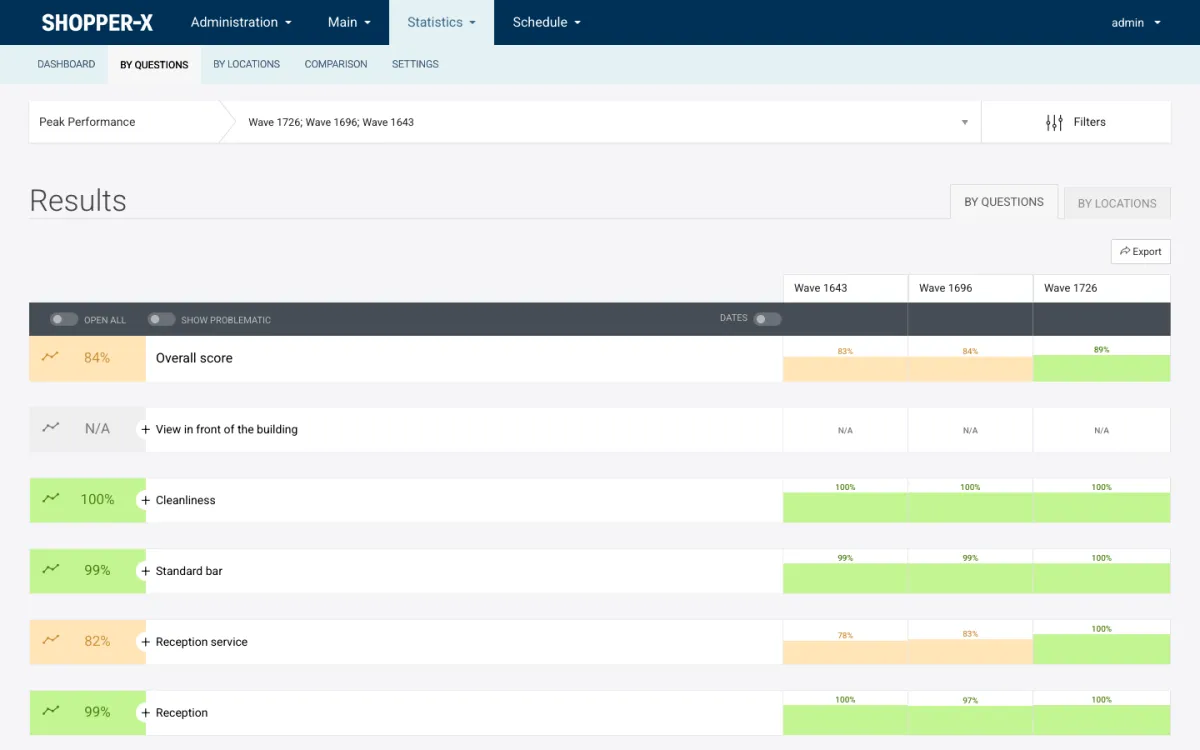
Every view exports to XLSX, PDF or HTML with the charts embedded. For the dealer meeting, the report builder saves pinned views into a report with a public web link that expires on a date the client sets. Views and filters are on the reporting page; the metrics worth tracking wave over wave are in mystery shopping KPIs.
FAQ
Does the shopper need to own the brand's car?
For a service visit, yes, and the questionnaire gate on car enforces it. For a sales visit, no; the gate there is a driving license and an age range, and the relationships-with-companies field keeps brand owners out of the non-owner scenario.
How is the follow-up question handled when it is answered days later?
The fill-in time is set per wave, so the report stays open long enough to cover the follow-up window. The shopper fills in the visit part first; in the app the draft is kept on the phone and synced, and the follow-up section is completed once the window has passed, before the fill-in deadline.
Can each dealer see its own results?
Client logins are read-only and scoped to one customer. Dealer-level results are shared through the client's comparison view and exports, or through a report-builder web link with an expiry date.
How are travel costs approved and paid?
Either as a flat transportation fee on the audit, or as a business trip with route legs, fuel and receipts that an administrator approves. Both land in the payment period export next to the audit fee.
See it with your own dealer list
Request a demo with a sales or service questionnaire from your own dealer program, or see pricing. There are also pages for retail chains, bank branches and hotels and restaurants, an overview of the whole platform at mystery shopping software, and a guide to running a mystery shopping program.