
Hotel and restaurant mystery shopping software has to capture a visit that unfolds over hours, sometimes over a night, with several staff members and several moments that can each go wrong. The questionnaire follows the guest's path, the shopper records times and photos along the way, and the client sees the result per property, not as one blended score. This page shows which parts of the Shopper-X platform carry that load.
What a hotels and restaurants mystery shopping program needs
Every brand writes its own standards, but the measurements in almost every hospitality program fall into a few groups, and each has to be captured in a way a validator can check and a client can compare across properties.
- Service timing. Time from entering to being greeted, from order to the first drink, from order to the dish, from asking for the bill to receiving it. At a hotel: the check-in queue and the room-service response. Recorded as clock times, not impressions.
- Standards and scripts. Was the guest greeted by name, was the loyalty program mentioned, was the daily special offered, was an allergy question asked. Yes or no, with a comment when the answer is no.
- Product knowledge and upsell. Could the server describe the dish or recommend a wine, did reception offer an upgrade or late check-out. "Offered" and "offered correctly" are separate questions.
- Cleanliness and condition. Restrooms, tables, the lobby, the room on arrival, the minibar. These need photo evidence, because a shopper's word alone is hard to defend when a property manager disputes the score.
- Billing accuracy. Does the bill match the order, were the prices the ones on the menu or rate card, was a receipt given.
- Complaint handling. The shopper raises a small staged issue, a cold dish or a missing towel, and records who responded, how fast, and what was offered.
How Shopper-X handles it
Questions that record times, photos and proof
The questionnaire builder draws questions from a shared bank and groups them into sections, so a hotel questionnaire runs reception, room, restaurant and check-out as separate sections with their own scores. A report holds time-of-check answers next to the scored questions, so "order to dish" comes from two recorded clock times rather than a guess. Each question can require a photo upload with a count, which is how the dish, the room on arrival and the bill get documented. A minimum comment length stops one-word answers.
A critical question marks the points the client cares about most. A disqualifying question fails the whole report on a wrong answer, the usual treatment for a shopper who skipped the required course or did not stay the booked night. Questions that collect the booking name or the bill can be flagged as private data and hidden from export.
Scheduling visits by property, city and time window
In scheduling, each audit is one shopper, one location and one questionnaire inside a wave. Every audit carries a time range and an audit period, so a breakfast, a lunch and a dinner scenario at the same restaurant are three audits with three windows. Custom fields on the audit hold the details a stay needs, the room category to book or the dish to order, and the shopper sees them in the inbox. Excluded dates keep visits off event nights, and the next quarter's schedule is cloned from the previous wave.
Shoppers who fit the scenario
Hotel stays are expensive visits, so the shopper has to be right the first time. Shopper management keeps each shopper's home city and the areas they can travel to, and eligibility rules per wave or questionnaire gate by age, city, car and driving license. Every validated report scores the shopper on scenario, report, evidence and timeliness, and the Bronze, Silver or Gold tier decides who is offered work first.
Validation that catches the weak report
Reports arrive from the web or the mobile app, where drafts and photos are kept on the phone and synced, and the same submission rules run on both. In report validation, the validator sees every answer and file, accepts each answer or leaves a remark on it, and can return the report for corrections; the shopper gets an edit button and resubmits. A client remark goes to the shopper by email.
Paying for the stay, the meal and the road
In shopper payments, each audit carries a fee, a transportation fee and an other fee, and the other fee covers the reimbursed meal or room charge. A shopper who visits several out-of-town properties groups the audits into a business trip with dates, transportation, route legs and receipts, which an administrator approves. Audits and trips are assigned to a monthly payment period, exported as a multi-sheet XLSX, and every shopper in the period gets a fee notification email.
A sample questionnaire section list
A hotel questionnaire usually follows the guest's path, one section per stage, each with its own percentage on the dashboard:
- Booking: phone or web reservation, confirmation, rate quoted
- Arrival and check-in: greeting, queue time, room explanation, upgrade offer
- Room on arrival: cleanliness, condition, amenities, photos required
- Restaurant or breakfast: seating, timing between stages, menu knowledge, order accuracy, dish photo
- Bar: greeting, timing, suggestion of a second order
- Housekeeping and room service: response time, completeness
- Complaint handling: the staged issue, who responded, what was offered
- Check-out and billing: bill accuracy, receipt, farewell, invitation to return
A restaurant-only questionnaire drops the room sections and splits the meal into greeting and seating, order taking, food and drink, service timing, upsell, bill and farewell, and restrooms. The questionnaire design guide covers weighting.
Reporting the client sees
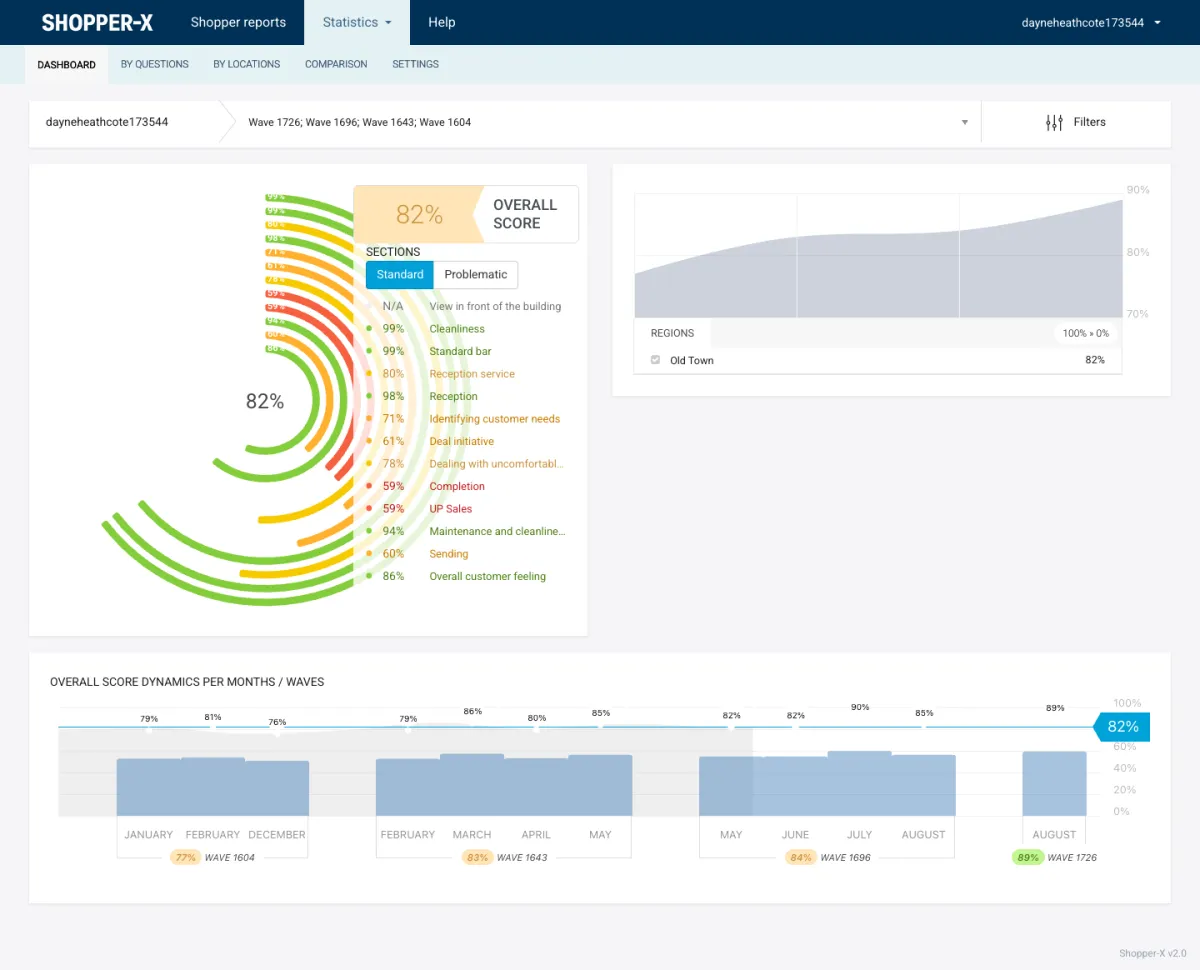
The client logs in to its own data only. The statistics dashboard shows an overall score ring with one segment per section, so the operations director sees at a glance whether the gap is in reception, the room or the restaurant. The regions panel shows the trend per region, and the score dynamics chart compares waves.
The comparison view puts properties side by side with the overall score per column and the percentage per section underneath. Color thresholds are set per user, so a property below the client's red line stands out. The individual reports page lists every validated visit with a PDF or XLS export and a download of all attached files. The mystery shopping KPIs article covers which of these numbers to track wave over wave.
FAQ
Can a shopper record the exact time of each service step?
Yes. A report holds time-of-check answers alongside the scored questions, and each audit has its own time range, so the validator can check that the visit happened in the window the scenario asked for.
How are overnight stays and meals reimbursed?
The meal or room charge goes into the audit's other fee, travel into the transportation fee. Out-of-town audits can be grouped into a business trip with receipts, approved by an administrator and exported with the monthly payment period.
Can the client see results per hotel rather than one average?
Yes. Statistics run by location, by region and by zone, and the comparison view places locations side by side with a score per section. A client account only ever sees its own properties.
What stops a shopper from skipping the required dish or photo?
Required photos, minimum comment lengths and disqualifying questions are enforced on submission, on the web and in the app. A report missing a required photo cannot be submitted, and a disqualifying answer fails it before it reaches the client.
See it with your own questionnaire
Request a demo with a questionnaire from your own hotel or restaurant program, or see pricing. Other sectors: retail, banking, automotive. New to this? Read how to run a mystery shopping program.