
Retail mystery shopping software has to cope with volume. A chain with 80 stores visited twice a quarter produces 160 reports per wave, each with photos, and the result only gets used if a regional manager can open it by district. Shopper-X is built for that: the administrator plans the wave, shoppers fill in from the mobile app, validators check every answer and photo, and the client opens a portal that puts stores side by side. This page covers the parts that matter for retail chains; the full module list is in the overview of mystery shopping software.
What a retail chain's mystery shopping program needs
Grocery, fashion, electronics and telecom stores ask different questions, but a chain program measures the same handful of things.
- Greeting and wait times. How soon the shopper was acknowledged, how long until a staff member was free, how long the checkout queue took. Recorded as times, not impressions.
- Availability and shelf standards. Whether the briefed product was on the shelf, priced and faced, and whether the promotion display matched what the client sent out. Each needs a photo on the question itself.
- Product knowledge. A scripted question the shopper asks and whether the answer was correct, in a written account long enough for a validator to judge.
- Add-on offer and checkout script. A second item suggested without prompting, the loyalty program mentioned, the receipt offered.
- Compliance items. Age verification, warranty wording, returns-policy statements. Mandatory items that should fail the visit when missed.
- Coverage. Every store, across dayparts, reported by district, city and store.
How Shopper-X handles it
Locations in the client's own hierarchy
Every store is a location under a customer, a city, a district and optionally a zone, with an object type for the store format. Import the store master from CSV or XLSX and move closed stores to the archive list instead of deleting them. The statistics module reads this hierarchy, so a store filed under the right district shows up in the right regional chart in every wave.
A wave per quarter, cloned from the last one
A wave is the campaign: a date range and the questionnaires that run in it for one client. The second wave starts by cloning the first: locations, audits, custom fields, wave settings and eligibility rules come across, and only the dates and the shoppers need attention. Visits can also be imported from XLSX. Each audit carries a time range, so a weekday lunchtime visit and a Saturday afternoon visit of the same store are two rows, and the wave settings hold excluded dates for inventory days and refits. The scheduling page walks through deadlines, statuses and bulk edits.
Questions with required photos and critical flags
Questions live in a shared bank grouped into sections, so shelf questions written for one chain can be reused for the next. Per question you set whether a photo is required and how many, whether a comment is required, a minimum comment length, and a weight; the editor shows the running sum of weights. Compliance items use two flags: a critical question, and a disqualifying question whose wrong answer fails the whole report. A "comment required at maximum score" flag stops top marks without a reason. The questionnaire builder page lists every question type and flag.
Shoppers who match the store
Eligibility rules per wave or questionnaire decide who can take an audit: shopping area coverage, age, whether a car or a driving license is needed for out-of-town stores. The client's restricted-shoppers list keeps named people off its program, and the "relationships with companies" field on the profile lets you pick shoppers who are not already customers of the brand. Gold, Silver and Bronze tiers, earned from validator scores, set who is offered work first. Details are on the shopper management page.
Validation before the client sees anything
A submitted report goes to a validator queue, not to the client. The validator sees every answer with its photos, accepts or questions each one, adds a remark the shopper receives by email, and can return the report for corrections. Reports that cannot be fixed are marked unacceptable. Only validated reports reach the client's reports list. See report validation.
Fees and the test purchase
Each audit carries the shopper's fee, a transportation fee and an "other fee" that can hold the test purchase. Audits are assigned to a monthly payment period, exported as a multi-sheet XLSX, and the shoppers in it get a fee notification email. See shopper payments.
A sample retail questionnaire, section by section
Order the sections the way the visit happens, so the shopper fills in from memory:
- Outside: facade and window clean, opening-hours sign correct, entrance clear. One required photo of the facade.
- Entry: greeted within the agreed time, staff visible on the floor.
- Floor: briefed product in stock and priced (photo of the shelf position), promotion display in place (photo), knowledge question answered correctly, add-on offered without prompting.
- Checkout: queue time recorded, receipt offered (photo), loyalty program mentioned.
- Compliance: age check performed or warranty statement given, flagged critical.
- Overall: one judgment question, kept apart from the facts, with a minimum comment length.
Weights per question decide what the score rewards: a chain that lives on add-on sales puts the weight on Floor, a chain with shabby stores moves it to Outside. The scoring math is in the guide to questionnaire design.
Reporting the client sees
The client logs in with its own account and sees only its own data. The individual reports page lists one row per validated visit with Excel and PDF export and a download of all files per row. The statistics dashboard shows the overall score ring per section, a regions panel with a trend, and score dynamics across waves. The comparison view puts stores, districts or zones side by side with a color-coded overall score per column.
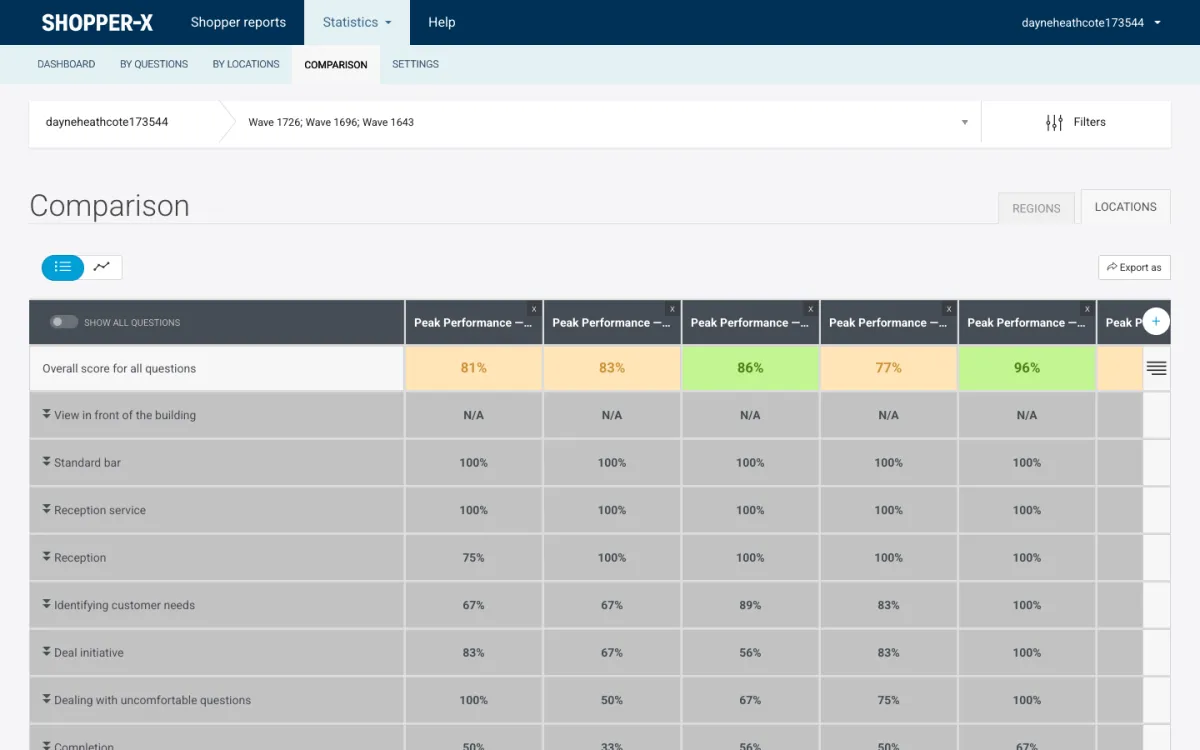
Color thresholds are saved per user, for example red up to 40 percent, yellow to 70, green above, and a "show problematic" toggle leaves only the results under the threshold. Any view exports to Excel, PDF or HTML with the charts included, and the report builder turns pinned views into a report shared as a web link with an expiry date. The reporting page covers the client portal in full; the post on mystery shopping KPIs suggests which numbers go on the first page.
Frequently asked questions
Can a regional manager see only their own stores?
The client login covers the whole customer; inside it the statistics filter by zone, district and location. For a manager without a login, build a report filtered to their district and share it as a web link with an expiry date.
How do shoppers submit photos from the store?
Through the mobile app on iOS or Android, with the same account as the web. Answers and photos are kept on the phone as a draft and synced to the server, and the server runs the same checks as the web form, so a missing shelf photo comes back as the failing question.
How is the test purchase paid back?
As the "other fee" on the audit, next to the shopper's fee and the transportation fee. It shows in the report head, in the audit payment list and in the payment period export.
Does the questionnaire have to be rebuilt every wave?
No. Clone the questionnaire, or copy questions from a previous one, and clone last wave's schedule. Keep the weights unchanged between waves, or the trend chart stops meaning anything.
See it with your own store list
Request a demo with a questionnaire from your own program, or see pricing. There are also pages for bank branches, hotels and restaurants and car dealerships, and a guide to running a mystery shopping program.