
This post explains how to run a mystery shopping program as a sequence of operational steps, from deciding what one wave measures to the moment the client opens the report. It is for the operations lead at an agency or the CX manager running an in-house program. Each step names who does the work (administrator, shopper, validator or client), what the screen shows in Shopper-X, and where the process tends to break. Start with the schedule instead of the shopper pool and you will build audits nobody can take.
Decide what one wave measures
A wave is a campaign for one client with a start date and an end date. It bundles the questionnaires that run in that period. A questionnaire is one scenario: a walk-in purchase, a product return, a phone enquiry. Keep them separate, because one questionnaire per scenario means one score per scenario, which is what the client can act on.
The unit you schedule and pay for is the audit: one shopper, one location, one questionnaire. So the scoping question is simple. For each location, how many audits per scenario in this wave? That number is the fee budget and the recruitment target per city. The questionnaire itself (sections, weights, required photos, minimum comment lengths) is covered in how to design a mystery shopping questionnaire.
Set up locations and master data
Every location (Shopper-X calls them objects) belongs to a customer, a city, a district and optionally a zone, and has an object type. The statistics module groups scores by region and location, the comparison view puts districts or zones side by side, and shoppers are matched to work by the cities in their coverage area. The hierarchy you enter at setup is the one the client will see in the dashboard, so agree it with the client first.
Locations are imported from CSV or XLSX and exported per customer with the full hierarchy. Import the locations before the audits; every audit is tied to one of them.
Build the shopper pool before the wave
This is the slow step and the one most often started too late. Shoppers register themselves: email verification, a profile photo, then a qualification test. The account stays in "waiting approval" until an administrator approves it.
The profile holds what the schedule later depends on: home city plus the areas the shopper can travel to, driving license, cars, industries worked in and relationships with brands. Before the first paid visit the shopper signs the contract once online and keeps a PDF copy; after that the identity fields lock.
Training sits on top: an entry ticket for general onboarding (100% required, valid 12 months), an industry qualification (valid 6 or 12 months) and a task instruction per client and scenario. A questionnaire can require a passed task instruction before a shopper may fill in its reports.
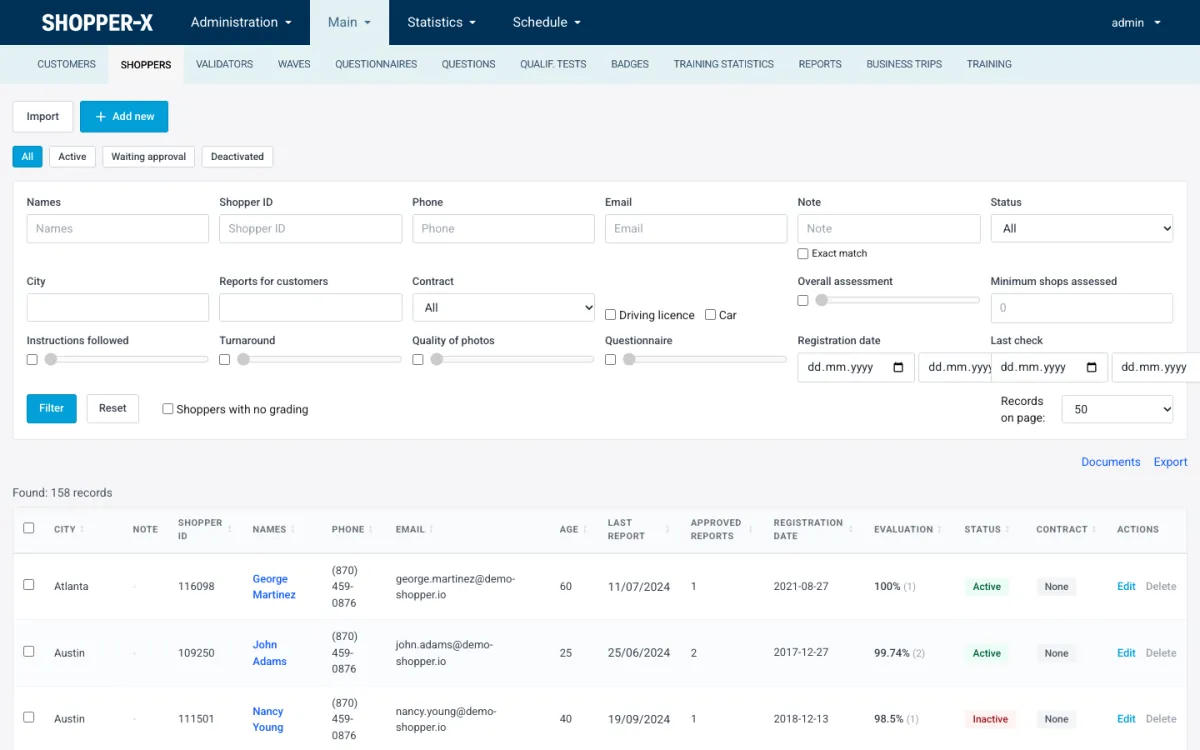
The shopper list is where you check coverage against the target from step one. Filter by city, status, contract and the customers a shopper has already reported for, and you have the number of people who can take an audit in that city this month. If it is below the audits planned there, recruit before you schedule.
Build the schedule
The administrator opens the wave and creates the audits: add empty audits per location, import them from XLSX, or clone the schedule of a previous wave, which copies locations, audits, custom fields, wave settings and shopper settings in one step. Custom fields are extra columns per audit that shoppers see in their inbox, such as the product to ask about.
Shopper settings per wave or per questionnaire hold the eligibility rules: age, city, car, driving license. Those rules, the shopper's coverage area and the client's restricted-shoppers list are enforced on the server when a shopper applies, so an ineligible application never reaches the administrator.
Assignment works two ways. For one audit, the administrator asks the system to suggest a shopper. For a whole wave, the audits are published as ads; shoppers browse them by city or questionnaire, apply with a proposed visit date and a comment, and the administrator bulk-assigns from the applications. Shoppers rated Gold are offered work first.
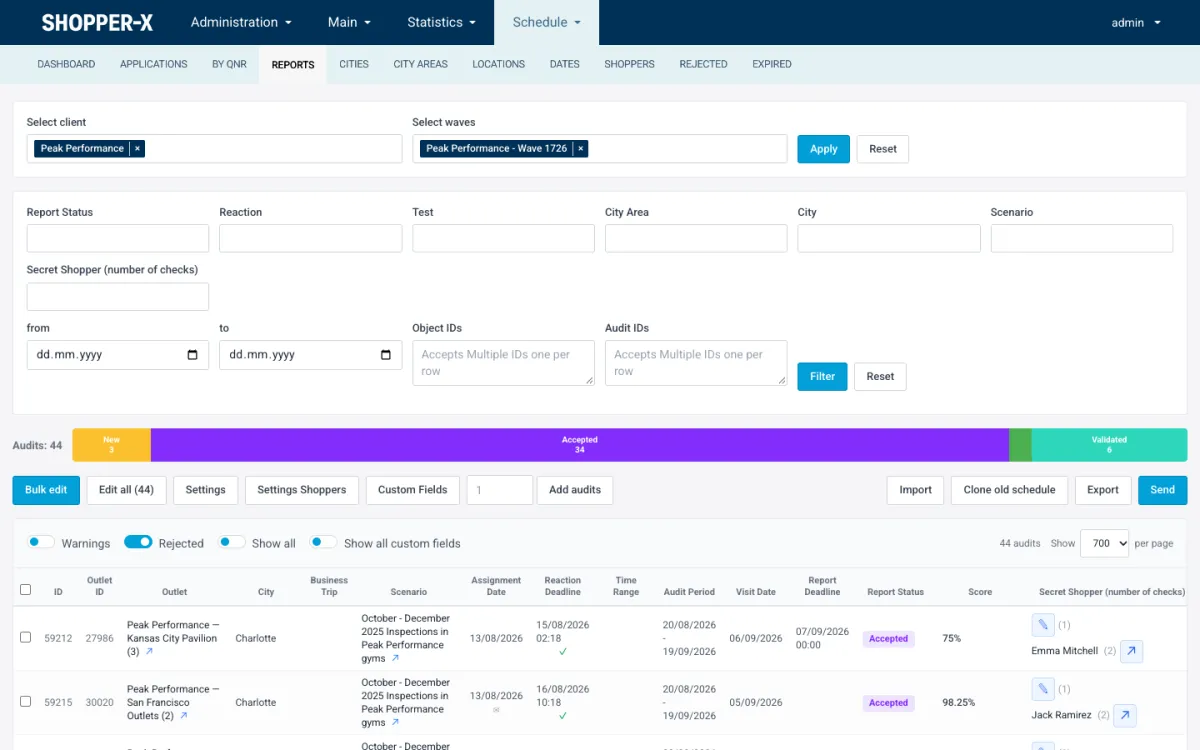
The audit list is the working screen for the rest of the wave. Each row shows location, scenario, assignment date, reaction deadline, visit date, report deadline, status, score and shopper. Bulk edit changes status, shopper, fee, visit dates and custom fields on many rows at once. When one administrator filters to a client and wave, the others see "Locked by" until that person leaves. The scheduling page describes the views, filters and the Excel export.
Deadlines and drop-outs
Two deadlines run per audit. The reaction deadline is how long the shopper has to accept or reject an assignment; the fill-in deadline is how long after the visit the report is due. Both come from the wave settings. A cron job keeps the reaction status current as waiting, overdue or reacted, so the overdue audits are one filter away. Reassignment is a human decision. During a live wave someone reads that list every morning.
Shoppers accept with a visit date, reject with a reason or ask to change the date, on the web or in the app. The 2-day rule applies on both: no rejection and no rescheduling when the visit is less than two days away. A rejected audit lands in the Rejected view with the reason, and the administrator assigns another shopper, replaces the audit or drops it.
An audit passes through eleven states: new, assigned, accepted, rejected, in progress, returned, completed, validated, dropped, replaced and unacceptable. The server allows only the transitions that make sense. Every change to every audit is in the revision history.
Validate before the client sees anything
A client in Shopper-X only ever sees validated reports. The validator is a separate role with a report queue and a report editor and no access to campaign management.
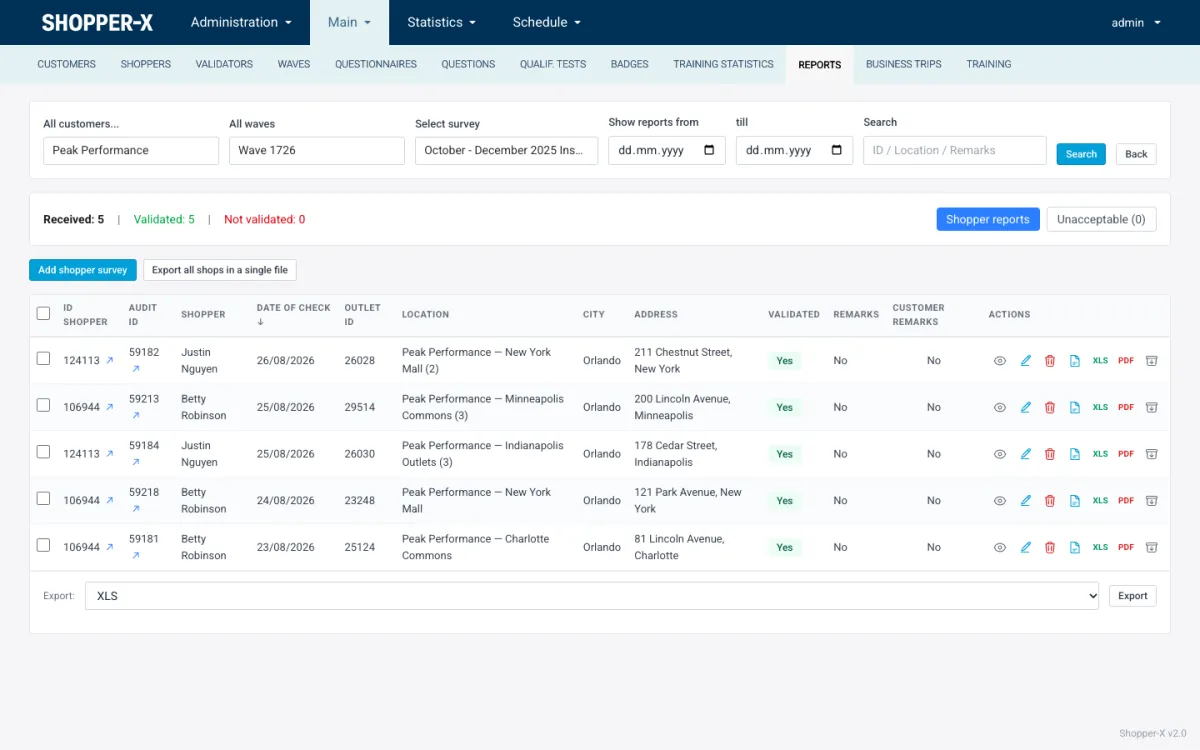
The queue is a list per customer, wave and questionnaire with counts of received, validated and not validated reports, a search box, a date range and an "unacceptable" tab. Inside a report the validator sees the head fields, then every answer with its files, a comment-length check, an accept toggle and a remark pencil.
Four outcomes are possible. Mark the report validated with a validator score. Add a client remark, which emails the shopper. Return it for corrections, which gives the shopper an Edit button and a resubmit. Or mark it unacceptable, which keeps it out of the client view and, by its audit status, out of the payment list. Every status change, score and remark is logged.
The validator score also rates the shopper on scenario, report, evidence and timeliness, with default weights of 40, 30, 20 and 10. The average puts the shopper in Bronze (below 70), Silver (70 to 90) or Gold (90 and above). The platform does not check a visit by GPS. Required photos, minimum comment lengths and the validator's reading of the report are what catch a visit that did not happen. See report validation for the full list of controls.
Pay on a fixed period
Fees live on the audit: fee, transportation fee, other fee and currency (EUR by default, BGN supported). They are set in the schedule, in bulk for a wave, or corrected in the report head during validation.
Payment runs on periods, usually one per month. The administrator filters the audit payment list by date, customer, wave, shopper and audit status, assigns the audits to the period in bulk and exports it as a multi-sheet XLSX with validated, compact IBANs. A fee notification email then goes to every shopper in the period. Filter by audit status to keep unacceptable and returned reports out of the period. There is no direct bank integration; the XLSX goes to whoever makes the transfers. Business trips with receipts are on the shopper payments page.
Deliver and close
The client logs in with its own role and sees only its own data. The statistics dashboard shows the overall score as a ring chart with one segment per section, a regions panel with a trend and score dynamics per month or per wave. A "show problematic" threshold highlights the questions under the agreed line.
The individual reports page lists one row per validated visit with View, XLS and PDF export and a download of all files. For a presentation the client or the administrator uses the report builder: saved chart and data views pinned into folders, dragged into a report and saved as draft, PDF, Excel or web. A web report gets a public link with an expiry date that can be switched off. The reporting page covers the views and exports.
For the next quarter, clone the schedule of the wave you just finished, set the new dates and start again at the shopper pool: check coverage, renew expired training, publish the ads.
What to automate first in a mystery shopping program
Approving a shopper, choosing who gets an audit and validating a report stay human. The messaging and bookkeeping around them do not need to.
- Assignment and change emails. New assignment, status change, date change and period payment emails go out from the system with editable text and a one-click unsubscribe.
- Deadline tracking. Reaction and fill-in deadlines come from the wave settings and the cron keeps the waiting / overdue / reacted status current.
- The period export and fee email. One export per month replaces a spreadsheet built from the schedule, and every shopper learns what they will receive.
- Training certificates and badges. Certificates expire by date or when a course changes version, and badges are re-awarded by a scheduler from rules you define.
FAQ
Do I need the shopper pool before I build the schedule?
You can create audits without shoppers; they sit as unassigned in the dashboard counters. But ads only fill when approved shoppers exist in the right cities, so the pool decides how fast the wave fills.
Can the client see a report before it is validated?
No. The client portal lists only completed and validated visits, and the statistics module counts only those. Returned and unacceptable reports never reach the client.
What happens when a shopper drops out two days before the visit?
Less than two days before the visit the shopper cannot reject or reschedule, on the web or in the app. Earlier than that, the audit moves to rejected with the reason and the administrator assigns someone else, replaces the audit or publishes it as an ad.
The whole sequence runs inside one system. Read what the platform covers on the mystery shopping software page, see how the schedule module handles the busiest part of it on scheduling, or request a demo and we will walk through your own wave.